If you are looking for the best quilting website, the right answer depends on the job in front of you. This guide compares eight useful sites across fabric shopping, kits and precuts, free patterns, instruction, and original quilt design so you can choose the right specialist at each stage.
What this guide covers
- What this guide covers
- The best quilting website depends on what you need
- Best quilting websites at a glance
- Choose a quilting website by what you are trying to do
- Best websites for buying quilting fabric, kits, and precuts
- Best websites for free quilt patterns and instruction
- Best website for designing and planning a quilt
- Quiltler vs. PreQuilt
- Continue planning your quilt
The best quilting website depends on what you need
A fabric retailer, a pattern publisher, and an online quilt design tool solve different problems. Ranking them as though they were interchangeable would hide what each one does well.
Fat Quarter Shop, eQuilter, Missouri Star Quilt Company, and Keepsake Quilting are the relevant choices when you need to purchase fabric or supplies. American Patchwork & Quilting and Suzy Quilts are stronger matches for established patterns and instruction. Quiltler and PreQuilt are the two original-design tools in this comparison.
For designing and planning a quilt before you cut fabric, Quiltler is the best choice in this group. It combines a design canvas, photographed stash fabrics, custom shapes, automatic yardage, cutting documents, and editable marketplace patterns. That conclusion applies to design and planning, not to buying physical fabric or finding the largest editorial archive.
Best quilting websites at a glance
Use this table to identify which kind of website matches your immediate task. Quiltler is highlighted because it covers the original design-to-cut workflow, while the retailers and publishers remain better choices for their specialties.
| Feature | Quiltler | PreQuilt | Fat Quarter Shop | eQuilter | Missouri Star | Keepsake Quilting | American Patchwork & Quilting | Suzy Quilts |
|---|---|---|---|---|---|---|---|---|
| Best use | Designing and planning a quilt | Browser-based design and coloring pages | Fabric, precuts, kits, clubs, patterns, and notions | Fabric selection and related patterns | Precuts, daily deals, and project videos | Kits, wide backing, clubs, and manufacturer patterns | Edited patterns and technique articles | Modern patterns and tutorials |
| Access or starting price | Free for 3 quilts and 5 fabrics; paid price not supplied | Free coloring pages; Basic $7.50/month or $50/year | Free to browse; products priced individually | Free to browse; products priced individually | Free to browse; products priced individually | Products priced individually; KQ Gold $99.99/year | Much is free; some patterns and issues are paid | Free resources; Cutting Table $12.99/month or $129.99/year |
| Platform | Modern browsers plus native Apple apps | Browser on computers, tablets, and phones | Browser-based retailer | Browser-based retailer | Browser-based retailer | Browser-based shop | Browser-based editorial resource | Browser-based website; patterns download to devices |
| Free resources | Yes Calculators, block guides, tutorials, and limited saved designs | Coloring pages at the free level | Yes PDF patterns and tutorials | Yes Free pattern area | Yes Videos, newsletters, and promotions | Yes Free pattern collection | Yes Articles, patterns, and other site material | Yes Tutorials and projects |
| Designs original quilts | Yes Yes | Yes Yes | No No | No Pattern finding rather than a general design canvas | No No | No No | No No | No No |
Retail product prices can vary. The table reports only the access models and subscription prices supplied for this comparison.
Choose a quilting website by what you are trying to do
Start with the task you need to finish rather than searching for one site that does everything. You may design in one place, buy fabric from another, and use a third site for construction guidance.
If this is your first project, the quilting guide for beginners explains the full process from supplies through binding. You can also browse the free quilt block pattern library before deciding whether to follow an established block or create your own layout.
- Design an original quilt: Use Quiltler for a touch-first canvas, photographed stash fabrics, custom cuts, automatic yardage, and cutting-summary PDFs. Consider PreQuilt when manufacturer color cards, SVG importing, randomization, Magic Quad, or public coloring pages matter more.
- Buy from a broad quilting retailer: Compare Fat Quarter Shop, eQuilter, Missouri Star, and Keepsake for the exact fabric, kit, backing, club, or notion you need.
- Shop for precuts and promotions: Missouri Star specifically specializes in precuts and daily deals. Fat Quarter Shop also offers precuts and coordinated clubs.
- Find kits or wide backing: Keepsake Quilting directly specializes in quilt kits and wide backing, as well as fabric clubs.
- Download free patterns: Check Fat Quarter Shop and Keepsake for downloadable and manufacturer projects. American Patchwork & Quilting and Suzy Quilts add editorial material and tutorials.
- Learn a specific project: Missouri Star provides project videos, while Fat Quarter Shop offers free tutorials. Suzy Quilts focuses on modern quilting, and American Patchwork & Quilting combines technique articles with tested projects.
- Preview your actual stash: Quiltler lets you photograph your fabric and audition it in a layout. PreQuilt also supports printed-fabric swatches on its paid plans.
Best websites for buying quilting fabric, kits, and precuts
The best website for quilting fabric is the one that has the material and product format your project requires. These four retailers are all free to browse, and each gives you a different reason to check its catalog.
Fat Quarter Shop sells fabric, kits, clubs, patterns, and notions. Its broad selection includes precuts and coordinated clubs, and it provides free downloadable PDF patterns and tutorials. Standard US shipping costs $4.95 below $80, while US orders over $80 ship free.
eQuilter is a fabric-focused retailer advertising more than 1,000 new products per month. It advertises free shipping on orders over $100 and provides a free pattern area that connects projects with fabrics and manufacturers. Its pattern experience helps with discovery and shopping, but it is not a general canvas for drafting a quilt.
Missouri Star Quilt Company is the clearest match for precuts and daily deals. Standard US shipping is $5.99 flat rate or free above $59. Its videos demonstrate how to piece specific patterns, but the website does not include an original quilt-design studio.
Keepsake Quilting deserves specific consideration for kits, wide backing, patterns, and fabric clubs. Ordinary US orders receive free shipping above $75. Its optional KQ Gold membership costs $99.99 per year and includes rewards and lower free-shipping thresholds, so it is more relevant to a frequent shopper than someone downloading an occasional pattern.
Check the exact item you need before choosing a retailer. Catalog focus, shipping thresholds, clubs, and promotions differ, so no single shop is automatically the best online quilt fabric store for every project.
Best websites for free quilt patterns and instruction
For downloadable PDFs, begin with Fat Quarter Shop, which offers free patterns and tutorials, or Keepsake Quilting, whose free-pattern collection contained 1,206 products when checked. Keepsake’s collection includes projects from FreeSpirit, Moda, Northcott, Robert Kaufman, and other manufacturers.
American Patchwork & Quilting, through AllPeopleQuilt.com, is a better fit when you want an editorial resource. Its projects pass through editors, quilt testers, and technical editors, and the site combines patterns, technique articles, cutting charts, quilt-alongs, and magazine archives. Much can be read free, although magazine issues, some patterns, and some quilt-along materials are paid.
Missouri Star is useful when watching a project being pieced is more helpful than reading a pattern alone. Its free resources include project videos, newsletters, and promotions. Suzy Quilts focuses on modern patterns, tutorials, free projects, and retained quilt-along material rather than operating as a general fabric marketplace.
Suzy Quilts also sells patterns and kits individually. Its optional Cutting Table subscription includes past issues, monthly tutorials, a pattern download, discounts, and a block-of-the-month program. If you need help with the wider construction sequence, use the step-by-step guide to making a quilt or consult a focused tutorial such as how to bind a quilt.
Best website for designing and planning a quilt
Fixed patterns and retail listings tell you what to buy or make, but they do not provide a general workspace for developing an original layout. The design stage requires you to arrange blocks, test color and fabric, set dimensions, and translate the result into material and cutting information.
Quiltler runs in modern browsers on Windows, Mac, Chromebook, Android, and iPad. It also has native apps for iPhone, iPad, Apple-silicon Macs, and Apple Vision Pro. The native iPhone and iPad app requires iOS or iPadOS 18.5 or later, and the canvas supports touch and Apple Pencil on iPad.
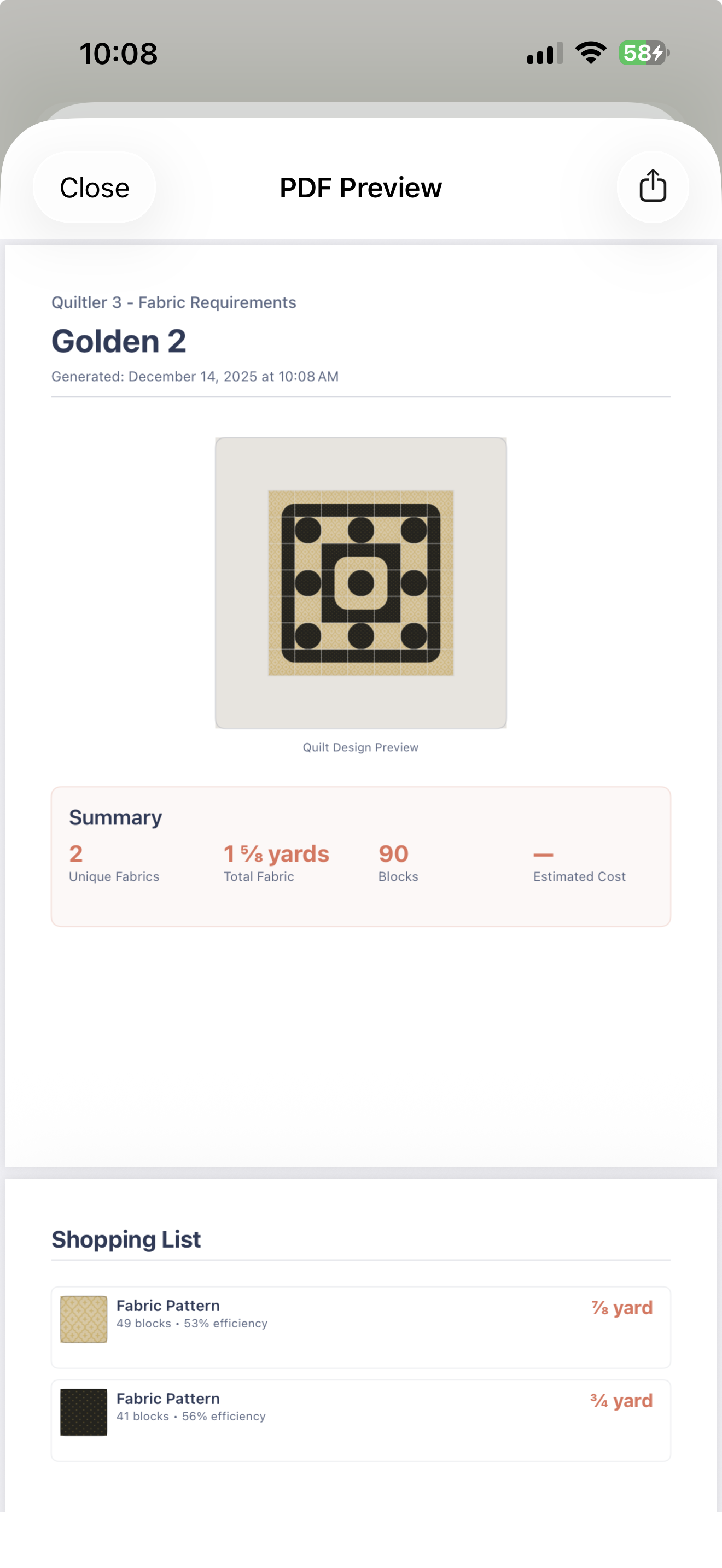
You can photograph fabrics from your real stash, organize them in the fabric library, and audition them in your quilt. Cut Designer creates shapes and blocks beyond the built-in library. When the design changes, Quiltler calculates fabric and yardage automatically and can export a cutting-summary PDF.
Purchased marketplace patterns open inside the studio, where you can recolor, resize, and replace fabrics. A pattern pack can include a shopping list, rotary cutting chart, assembly map, and true-scale templates. This creates a continuous path from choosing or creating a design to preparing it for cutting.
Quiltler is free to start with up to three quilts and five fabrics. It also provides free fabric, binding, backing, batting, half-square-triangle, and fat-quarter calculators. For a calculation outside the studio, use the quilt fabric calculator, binding calculator, or backing calculator.
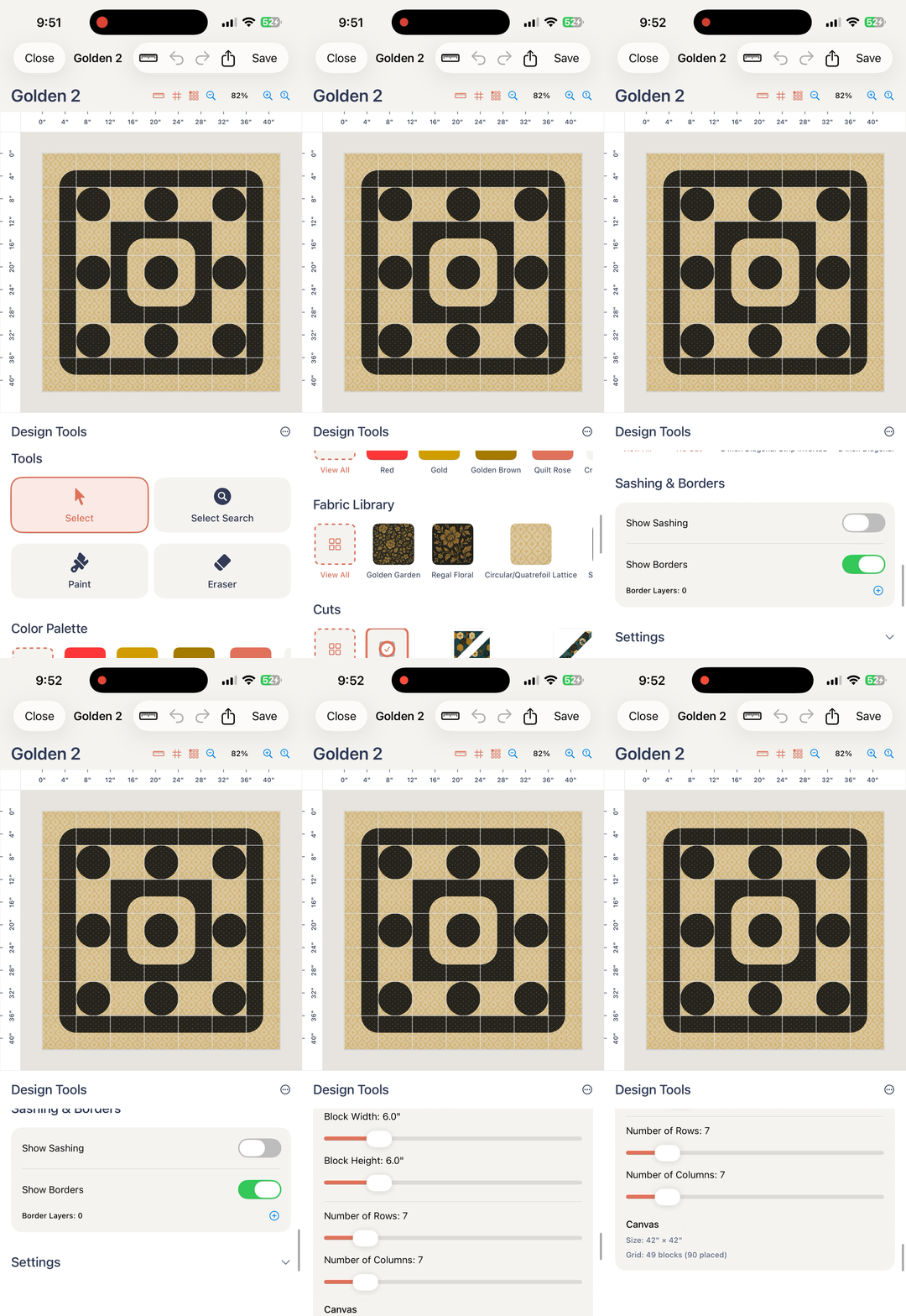
Quiltler is rated 4.8 stars by quilters on the App Store. You can start in the browser-based studio without committing to a paid plan.
Quiltler vs. PreQuilt
PreQuilt is the direct competitor in this list because it also provides a browser-based original quilt-design environment. It works on PCs, Macs, tablets, and mobile phones, while Quiltler combines its browser studio with native Apple apps.
PreQuilt’s free access supports coloring pages but includes zero saved quilts and zero stored fabrics. Its Basic plan costs $7.50 per month or $50 per year and permits 50 quilts and 250 fabric swatches. The Market plan costs $10 per month or $100 per year, provides unlimited quilts and swatches, and adds public coloring pages and calls to action for pattern designers.
PreQuilt is genuinely the better fit if you specifically need manufacturer solid-color cards, printed-fabric swatches, SVG importing, randomization, Magic Quad, or interactive coloring pages that send shoppers to an external designer store. It also calculates yardage. Pattern designers who want public coloring pages should give it serious consideration, although PreQuilt acknowledges that its software has a learning curve.
Quiltler is the stronger choice when you want the design to continue into practical cutting and construction outputs. Its free tier saves up to three quilts and five fabrics, its canvas is touch-first, and its marketplace patterns open as editable projects. Photographed stash fabrics, custom Cut Designer shapes, automatic yardage, cutting-summary PDFs, project sync, and pattern packs make it the more complete design-to-cut workflow in this comparison.
For a broader look at software choices, see best quilt design apps. If you primarily design on a tablet, the quilting app for iPad guide covers Quiltler’s touch and Apple Pencil workflow in more detail.
Continue planning your quilt
How to Design a Quilt
Plan dimensions, blocks, color, fabric, and layout before you begin cutting.
Quilt Color Theory
Use value, contrast, print scale, and color relationships to build a workable palette.
Quilt Design Gallery
Browse quilt layouts, blocks, and color combinations shared by the Quiltler community.