A quilting app search is a buying search. People want to know which program designs, which one only calculates, which one colors a pattern, and which one folds quilting into embroidery and a shop map. Quiltler is the studio we make — a browser designer with iPhone and iPad apps, plus twenty-four calculators that stay free. We will say where Makerly, PreQuilt, Quilt Geek, Electric Quilt, or an iPad-only app is the better hire. The head-to-head with Makerly is Quiltler vs Makerly. This page is the map.
On this page
- On this page
- Five jobs people hire a quilting app to do
- Four quilting apps at a glance
- How to choose before you subscribe
- When the job is a quilt you will sew
- When the job is coloring a pattern
- When the job is a whole craft login
- When the job is only the math
- Desktop software, an iPad, and a project list
- Who should open which quilting app
- The comparisons behind the map
Five jobs people hire a quilting app to do
- Design a top you will cut. Blocks, sashing, borders, and odd shapes should be real sizes. Yardage should move when the layout moves. If the file cannot become a cutting chart, you will draw the quilt a second time on paper.
- Answer one sum. Binding, backing, a half-square triangle, or a hanging sleeve is a number for the shop, not a reason to subscribe to a designer. The sum should open with no account.
- Color a pattern you already own. Auditioning fabric on a published block is a real afternoon. It is a different afternoon from inventing the pieces.
- Keep quilt, embroidery, and local shops in one login. A hoop file, a thread match, and a shop directory are craft jobs. They share a subscription with quilting only when you actually do all three.
- Stay on the computer you already use. A Windows desk, a Chromebook, an iPad on the sofa, and an Android phone in the aisle are different hires. A native app on the wrong phone is a pretty icon you will not open.
Four quilting apps at a glance
Labels, not sentences. Electric Quilt and Quiltography sit under the desk and iPad sections below. Prices move; this table does not freeze them.
| Feature | Quiltler | Makerly | PreQuilt | Quilt Geek |
|---|---|---|---|---|
| The job | Design, plus free math | Quilt, embroidery, shops | Color and visualize | Phone calculators |
| Design | Yes Piecing, cuts, packs | Yes Blocks, colors, stash | Yes Color a pattern | A small unit grid |
| Calculators | Yes 24, every one free | Seven, four free online | No Not the product | 20+, mostly paid |
| Sewable output | Yes Chart, pack, templates | Cut list in the app | A coloring page | Numbers for the grid |
| Platforms | Yes Web, iPhone, iPad | Yes Web, iPhone, Android | Yes Any browser | Yes iPhone and Android |
| Android app | No Phone browser | Yes Native app | No Phone browser | Yes Native app |
| Free start | Yes One quilt, two fabrics | 14-day full trial | A subscription | Binding and backing |
Makerly describes four free website calculators — backing, batting, binding, and borders — and a 14-day trial of the rest. Quilt Geek’s maker describes binding and backing as the calculators that stay free. Confirm PreQuilt’s plans with them. Quiltler prices live at checkout; terms are the legal copy. The full Makerly split is Quiltler vs Makerly.
On Quiltler, design is free to try. A free account keeps one saved quilt and two fabrics. The twenty-four calculators do not use that allowance, and they do not ask for an account. A trial that ends is a different gate.
How to choose before you subscribe
Five checks. If a logo fails the job you named in the first step, the rest of its feature list does not matter.
- Name the job Write one sentence: design a top, run a sum, color a bought pattern, embroider, or find a shop. A quilting app that wins a different sentence is a different purchase.
- See where the yardage comes from If you are designing, the fabric total should follow the pieces. If you only need binding, open a binding calculator and stop. Retyping the same quilt size into a second app is what happens when design and math live apart.
- Match the device in your hand Browser and iPad point at Quiltler or, for coloring, PreQuilt. Android points at Makerly or Quilt Geek. A locked work PC or a Chromebook points at a quilt designer for web, because nothing installs.
- Read the free gate out loud Quiltler: the canvas stays open, one saved quilt and two fabrics, every calculator free. Makerly: four calculators free, then a 14-day trial of the app. Quilt Geek: binding and backing free, the rest of the math paid. A trial and a free tool are not the same sentence.
- Make one real block Open the studio and stamp a block you have sewn before. If the file cannot tell you what to cut, it is the wrong hire for a quilt you will sew.
When the job is a quilt you will sew
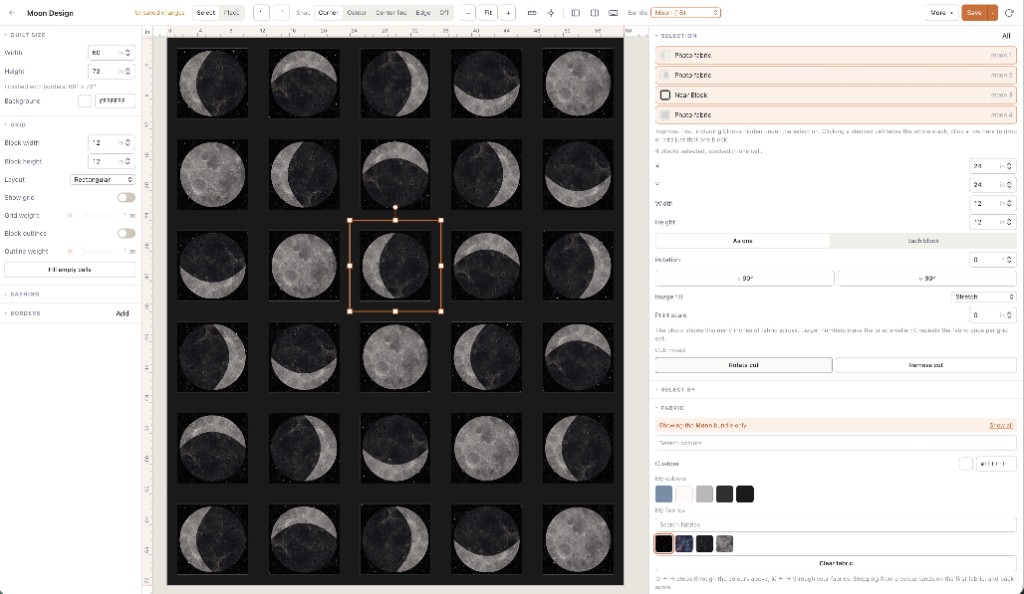
Quiltler is quilt design software in the browser and on iPhone and iPad. You stamp a classic, draft on a grid, or draw a shape, then set sashing and borders until the bed size is right. Fabric photos of cloth you own go on that layout. Finished size and a fabric total stay on screen. The paid pack is the shopping list, the cutting chart, and true-scale templates, including mirrored sheets for foundation paper piecing. Hexagon papers are a separate sewable job: English paper piecing. A picture turned into pieces, rather than a printed panel, is the photo quilt maker.
That is the case for Quiltler as a quilting app: the design and the math share the pieces, and the calculators for a one-off sum stay free beside it. The online quilt designer is the no-download session. The iPad version of the same account is the quilting app for iPad. A bought pattern from the marketplace opens on the canvas so you recolor it in cloth you own.
Roundups sometimes file Quiltler with design-only tools and leave the calculators off the row. The calculator directory is twenty-four tools, including a thread calculator that estimates spools from stitch spacing. It does not convert thread brands, and it does not draw a pantograph. Those are different products.
When the job is coloring a pattern
PreQuilt is a browser tool many quilters use to color and visualize a pattern, with no installer. If that is the whole afternoon — audition fabric on work you did not draft — it can be the better quilting app. Quiltler’s coloring still sits on pieces that can become a cutting chart. The fair split, including where PreQuilt’s marketplace and cloud save earn the tab, is the PreQuilt alternative.
A coloring page and a pattern pack solve different afternoons. If you already know the cutting chart and you only want to see the fabrics, do not pay for a studio you will not draft in.
When the job is a whole craft login
Makerly is the app that puts a quilt designer, seven calculators, a fabric stash, embroidery, a pantograph preview, and a local shop directory on one subscription. Their pages name the web, iPhone, and Android. Four calculators stay free on the website. The designer, the other calculators, and the saved work sit behind a 14-day trial. If you embroider in the same week you quilt, if Android is the phone, or if a map of shops is why you open the app, Makerly is the honest hire.
Quiltler does not include that embroidery bench, that thread-brand converter, or that shop directory. It also does not put the quilt calculators inside the trial. Binding, backing, batting, borders, triangles, sashing, precuts, and the rest of the directory stay free with no account. The subscription is the design studio: more than one saved quilt, more than two fabric photos, and a pattern pack. Read the concessions in full on Quiltler vs Makerly before you decide from a checkmark table.
When the job is only the math
Quilt Geek is an iPhone and Android calculator. The listing advertises 20+ tools, and the upgrade unlocks most of them, plus saving a calculation. Binding and backing are the ones their maker describes as staying free. Quilt Builder previews a grid of a few unit types. That is a real pocket tool. It is a poor hire if you wanted a studio, and an expensive hire if you only wanted the arithmetic.
Quiltler’s calculators are the larger free set, in the browser and in the iPhone and iPad app. They do not spend the free quilt. If the phone must be Android and the only job is math, Quilt Geek can still be the better app. The structural difference — you pay them for calculators, and you pay Quiltler for the studio — is Quiltler vs Quilt Geek.
Desktop software, an iPad, and a project list
Electric Quilt 8 is still the deep desktop install: a large traditional block library and a one-time purchase you should confirm before you buy. It does not run in a browser or on an iPad. If that chair is already paid for and you never leave it, keep it. The fair split is the Electric Quilt comparison. The tests for “best,” without a fake ranking, are on best quilt designer. A named table of design apps is the 2026 app roundup.
Quiltography is a focused iPad app. If you will never design on a Windows PC or in a browser, start with the Quiltography comparison rather than a page about phones in general.
Project organizers — progress photos, a cutting checklist, yardage set aside — assume you design somewhere else. Quiltler keeps the design and the fabric total. It does not replace a dedicated works-in-progress log. If the list is the product you open every night, hire the list.
Who should open which quilting app
Open Quiltler if you want to design in a browser or on iPad, keep the calculators free, and pay only when the library and the pattern pack are what you need. Open Makerly if embroidery, Android, or a shop directory is part of the same week. Open PreQuilt if coloring a pattern is the whole task. Open Quilt Geek if the Android calculator, with its charts and its paid math, is the tool you already understand. Open Electric Quilt if the desktop library is the reason you sat down.
Free accounts on Quiltler keep one saved quilt and two fabrics. That is the cabinet, described on free quilt design software. The canvas does not expire on day fourteen. Beginners who want the first quilt without a software tour can start at how to design quilts.