A best quilt designer page that cannot say what “best” means is selling a badge. Quiltler is the studio we make — a browser designer with iPhone and iPad apps — and we will say where a desktop install still earns the chair. For a table of named products, use the 2026 app roundup. This page is the buying question.
On this page
Five tests that actually matter
- Geometry you can sew from. Blocks, sashing, borders and custom cuts should be real sizes, not decoration. If the file cannot become a cutting chart, you will graph the quilt a second time on paper.
- Fabrics you already own. Named manufacturer libraries are useful. Photographs of the bolts on your shelf are useful in a different way. Quiltler’s fabric tools are built around photos of cloth you have, not only a catalog of SKUs.
- Yardage that updates with the layout. Exact sizes and yardage for a design you make come with a $4.99 unlock of that layout or Quilter. Public calculator pages stay free. Demand the same honesty from anyone advertising “free.”
- The computer you will actually use. A work Windows laptop, a Chromebook at guild, an iPad on the sofa, and a phone in the fabric aisle are different jobs. A quilt designer for web does not force an installer for the desk job.
- A library that does not vanish. Designing once is a demo. Keeping a season of quilts is a practice. Quiltler gates the library, not the canvas: one saved quilt and ten fabrics on free.
Why “best quilt designer for web” is a different question
A lot of “best” lists still assume you will buy a Windows or Mac program and leave it on one machine. That is a fair life if you draft at a desk and never touch the file elsewhere. It is a poor fit if you need the same quilt on a PC that will not let you install software, on a Chromebook, or in a library browser.
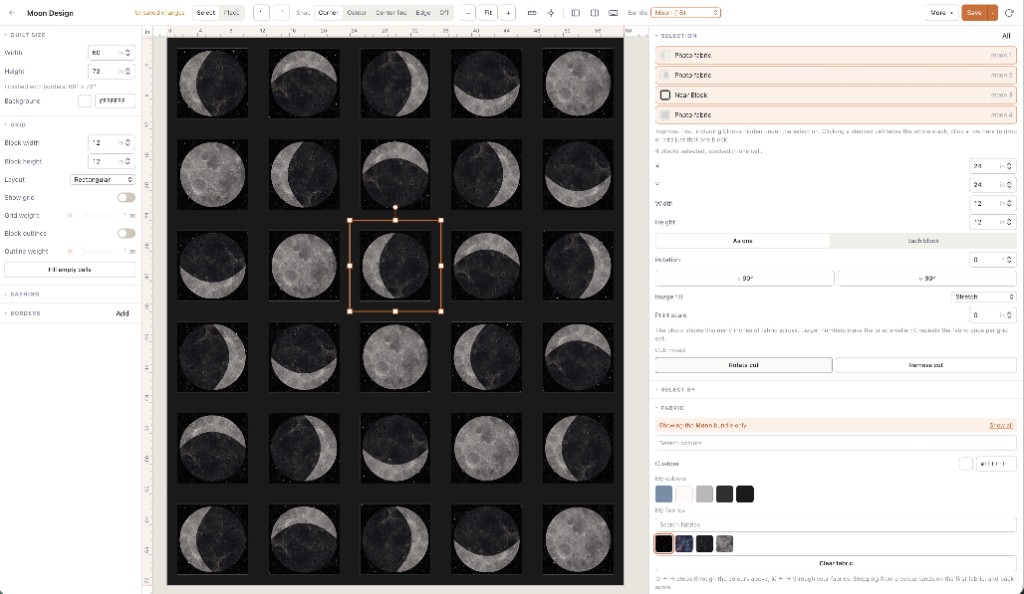
Web here does not mean a watered-down preview. Quiltler’s studio at the app is the same product we ship to iPhone and iPad: block grids, half-drop layouts, sashing, borders, a block drafter, custom cuts, and a layout you can push around until the bed size is right. Pattern packs can include true-scale templates and optional mirrored sheets for foundation paper piecing — Quiltler is piecing software, not a colouring page. The online quilt designer page walks the no-download session.
Where Quiltler is genuinely strong
Quiltler is quilt design software that runs in a modern browser and syncs to companion apps. You can stamp classic blocks, draft a block on a grid, draw odd shapes in the Cut Designer, and build a layout with sashing and borders. A Quiltler-designed listing includes that pattern and opens on that canvas so you can recolour it in cloth you own. A designer’s PDF is that file, not an editable Studio design, and what it contains depends on the listing.
That combination — browser studio, stash photos, sewable output, and a market of editable Quiltler designs — is the case for Quiltler as a web-first designer. A professional who lives in Electric Quilt’s block library and prints from a desktop workflow may be better served staying there. We would rather you keep EQ8 than migrate for a slogan. The Electric Quilt comparison is the fair split.
Patchwork that is mostly squares and triangles is a first-class job here. If you are new to digital drafting, start with how to design quilts and quilting for beginners rather than this criteria list.
Where another tool is the better pick
Electric Quilt 8 still has the larger traditional block catalog and decades of desktop printing habits. It is a one-time purchase (confirm current pricing). It does not run in a browser or on an iPad. If that install is already paid for and you never leave the desk, it can be the better designer for you.
Quiltography is a focused iPad app. If you will never design on a Windows PC or Chromebook, an iPad-only tool can be enough. Quiltler’s bet is that most people still need the desk as well as the tablet. See the Quiltography alternative if that is the comparison you typed.
PreQuilt and other browser colourers can be enough if you only need to recolour a grid. They are not trying to be a cutting-chart studio. Compare features, not star graphics.
No fake scoreboard. We do not publish invented review averages for competitors, and we do not call Quiltler “Google’s #1.” App Store ratings live on the store listing. Treat any number on a marketing page as a snapshot, not a trophy.
How to try without a ranking
Open the designer in the browser. Drop a nine-patch or a star, photograph a background and a focus print (free accounts keep ten fabrics), and watch finished size change when you add a border. Save one quilt if you want it waiting next time. That is the whole argument: either the canvas feels like designing, or it does not. Designing is free; the gated part is the library — typically one saved quilt and ten fabrics — plus cutting charts and printable packs.
When you want the same quilt on the sofa, the iPhone and iPad apps use the same account. Designing there is not a separate product; it is the same geometry with touch and Apple Pencil.
Who this page is for
It is for quilters comparing tools because they typed “best quilt designer,” not because they already love one brand. Hobby sewists who plan a few quilts a year, teachers who need a Chromebook-safe studio, and designers who might later sell patterns all fit, as long as they care about sewing the result. It is not for people hunting a pirate of EQ8 files — Quiltler does not open proprietary Electric Quilt projects. Recreate the layout; export Quiltler’s own pack.
Designing is free. Paid plans are the library, cutting charts, pattern packs, and (Designer) selling. Confirm prices at checkout; terms are the legal copy.
Keep choosing
Quilt design software
What the category is, and what Quiltler does as a full studio.
Online quilt designer
A no-download session in the browser, step by step.
Electric Quilt alternative
A fair EQ comparison: library depth vs a browser studio.
Best quilt design apps
Named products in a table, if you wanted the roundup not the tests.
Why Quiltler is different
Built today, with quilters — not a legacy desktop clone in a tab.