If you are looking for a PreQuilt alternative, the useful question is how far each tool carries your project. This comparison follows a quilt from layout and fabric selection through yardage, cutting documents, and assembly output, while recognizing the areas where PreQuilt offers stronger specialist tools.
What this comparison covers
- What this comparison covers
- PreQuilt vs. Quiltler at a glance
- Platforms: browser access versus a native companion
- Pricing and what each free tier lets you keep
- Design tools and fabric-stash workflows
- Yardage and cutting calculations
- What can leave the browser?
- PreQuilt strengths and limitations
- Quiltler strengths and limitations
- Which workflow is the better fit?
- Continue comparing quilt design tools
PreQuilt vs. Quiltler at a glance
Both products let you design quilts in a browser, use personal fabric images, and calculate fabric needs. Their free access, mobile workflows, specialist tools, and final exports differ.
| Feature | Feature | Quiltler | PreQuilt |
|---|---|---|---|
| Desktop platform | Modern desktop browsers | PC and Mac browsers | |
| Mobile access | Native companion and browser | Tablet and phone browsers | |
| Maker subscription | $7.99 monthly; $49.99 yearly | $7.50 monthly; $50 yearly | |
| Designer subscription | $11.99 monthly; $99 yearly | $10 monthly; $100 yearly | |
| Free saved quilts | One quilt | Zero quilts | |
| Free stored fabrics | Five fabrics | Zero fabrics | |
| Free visible yardage | Yes Yes | Paid calculator | |
| Photographed stash fabrics | Companion camera workflow | Photographed swatches supported | |
| Automatic yardage | Yes Yes | Paid plans | |
| Image exports | Assembly map in pack | Quilt-map and blocks JPGs | |
| Cutting output | Rotary chart and templates | Calculation and diagram PDFs | |
| Pattern instructions | Subscribed pattern pack | No No |
PreQuilt’s Fabric Calculator does not work on designer coloring pages or SVG-imported blocks, and it does not currently provide templates for curved units. Quiltler pattern packs and cutting templates require a subscription.
Platforms: browser access versus a native companion
PreQuilt is a browser-based application with cloud project storage. Its official platform information says you can use it through a browser on PCs, Macs, tablets, and mobile phones, giving it broad access without tying the design environment to one desktop operating system.
Quiltler’s main online quilt designer also runs in a modern browser on Windows, Mac, and Chromebook. It adds a native companion for iPhone and iPad, with finger input and Apple Pencil support on iPad. The companion requires iOS or iPadOS 18.5 or later and can also run on Apple-silicon Macs and Apple Vision Pro.
This distinction is about workflow rather than simple availability. PreQuilt provides browser access on mobile devices, while Quiltler gives Apple users a touch-first companion for photographing fabrics and working with synced projects. If you use a non-Apple phone or tablet, PreQuilt’s documented mobile-browser support may fit better; Quiltler’s desktop browser studio remains its primary design space.
Pricing and what each free tier lets you keep
PreQuilt Basic costs $7.50 per month or $50 per year. It supports up to 50 saved quilts and 250 patterned fabric swatches. Market costs $10 per month or $100 per year and adds unlimited quilts, unlimited fabric storage, and interactive coloring-page publishing tools.
Quiltler’s Quilter subscription costs $7.99 per month or $49.99 per year. Designer costs $11.99 per month or $99 per year. The annual maker prices are effectively the same, so the better choice depends on the workflow and output you need rather than a meaningful annual price difference.
The free tiers separate the products more clearly. PreQuilt offers a demo and free designer coloring pages using solid colors, but its plan comparison allows zero saved quilts and zero stored fabrics for free users. Quiltler requires no card and lets you design and recolor, save your first quilt, keep five personal fabrics, view yardage, and browse the community and marketplace.
A Quiltler subscription removes the saved-design and fabric limits while adding pattern packs, cutting templates, community imports, publishing, and pattern selling. You can review the broader desktop and companion workflow before deciding if those additions match how you design.
Design tools and fabric-stash workflows
PreQuilt has the broader documented collection of specialist layout and experimentation tools. It provides rectangular, triangle, and on-point grids, multiple saved colorways, color and block randomization, Magic Quad tools, a Block Maker, and SVG block imports. It also includes solid-color cards from major fabric manufacturers.
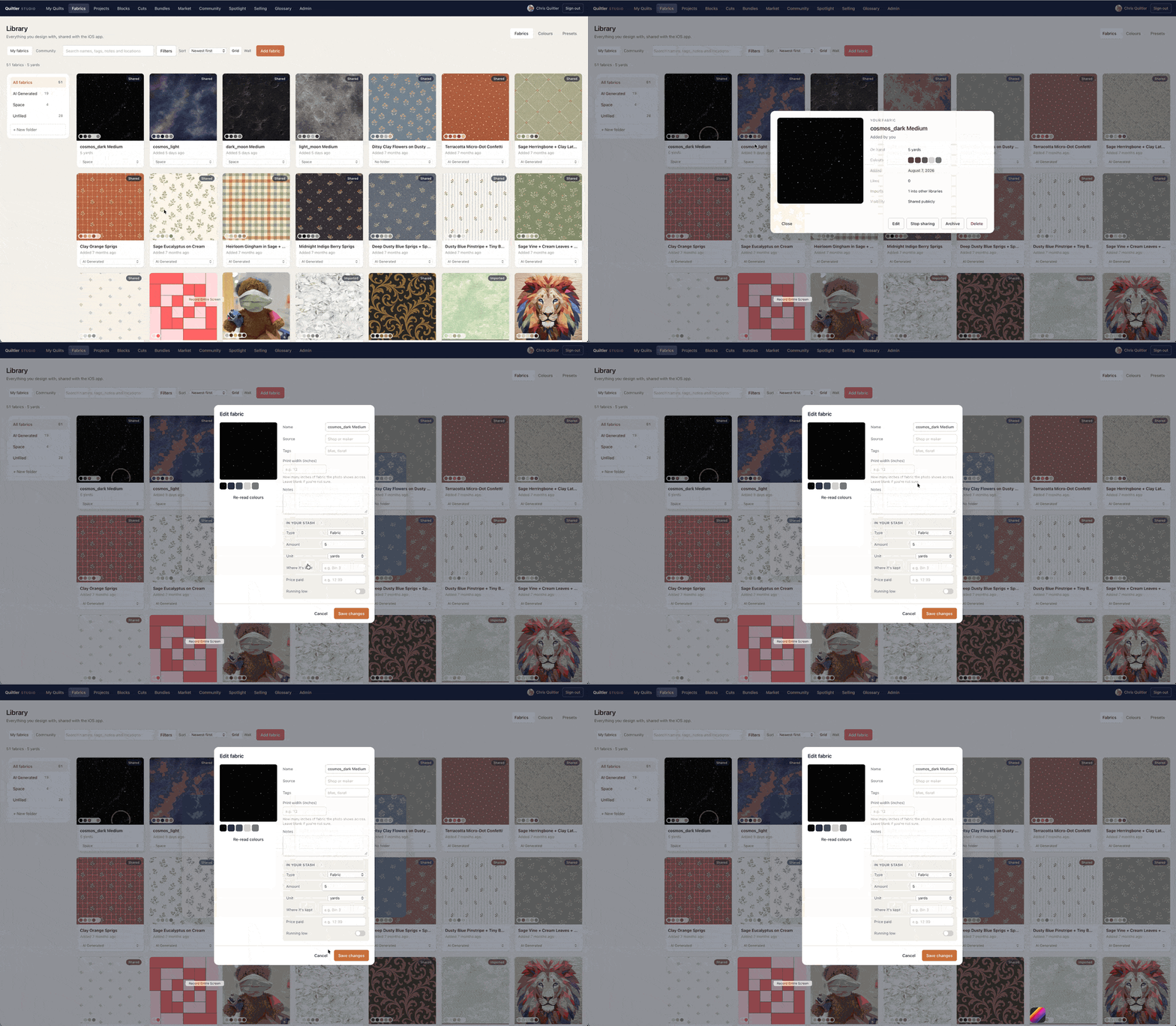
Its fabric tools support printed swatches downloaded online or photographed from a physical stash. You can set the scale of a patterned swatch, which matters when a large motif needs to appear proportionally in the quilt. Quiltler also supports true-size fabric handling, with more detail in the fabric print scale guide.
Quiltler’s distinguishing feature is the connection between the desktop studio and its companion camera workflow. You can photograph fabric from your real stash, retain it in your library, and audition it in a layout. Its Cut Designer creates shapes and blocks beyond the built-in quilt block library.
Choose PreQuilt when triangle or on-point grids, commercial solid cards, SVG imports, Magic Quad, or extensive randomization are central to your process. Choose Quiltler when you want your photographed stash, saved project, automatic fabric math, and final pattern documents connected inside one account.
Yardage and cutting calculations
PreQuilt’s paid Fabric Calculator provides detailed planning information. It covers quilt-top, backing, and binding yardage, along with individual block breakdowns. You can adjust fabric widths and view recommended width-of-fabric cutting diagrams.
The calculator also lets you rotate pieces and borders to test more efficient cutting arrangements. That level of documented control is a genuine PreQuilt strength, especially when you want to inspect and refine cutting layouts before buying fabric. Its limits matter, however: it does not work on designer coloring pages or SVG-imported blocks.
Quiltler calculates fabric and yardage automatically as part of the design workflow, and free users can see the yardage required by their design. It can export a cutting summary as a PDF, while subscribed pattern packs add rotary cutting sizes and true-scale templates. The cuts and fabrics guide explains how the way a block is constructed affects Quiltler’s yardage totals.
For a separate estimate before building a full design, Quiltler also provides a free quilt fabric calculator. PreQuilt is stronger when you want documented control over fabric width and piece rotation; Quiltler is stronger when you want visible free-tier yardage that continues into a unified pattern export.
What can leave the browser?
PreQuilt does not trap a completed design in the browser. It can export a quilt-map JPG, a colors-and-blocks JPG, and printable PDFs containing fabric calculations and cutting diagrams. These are useful references for planning fabric and organizing construction.
PreQuilt explicitly states that its Fabric Calculator does not produce pattern instructions. It also does not currently provide templates for curved units. Its exports therefore cover design images, calculations, and cutting diagrams rather than a complete instructional pattern pack.
A subscribed Quiltler project can become one pattern pack containing a shopping list, a cutting chart with rotary sizes, an assembly map, and true-scale templates. This packages the main shopping, cutting, layout, and template documents together instead of requiring you to assemble separate exports.
That difference is the strongest reason to choose Quiltler as a PreQuilt alternative. PreQuilt may still be the better design environment for specialist layouts and experimentation, but Quiltler carries a custom project further from the design canvas toward the cutting table.
PreQuilt strengths and limitations
What works about PreQuilt
- Browser access across PCs, Macs, tablets, and phones
- Rectangle, triangle, and on-point layout grids
- Colorways, color randomization, and block randomization
- Magic Quad, Block Maker, and SVG block imports
- Commercial solid-color cards from major manufacturers
- Adjustable fabric widths and cutting-layout rotation
- Interactive coloring pages with external-store calls to action
Where it falls short
- Free access includes no saved quilts
- Free access includes no stored fabrics
- General Fabric Calculator requires a paid plan
- Calculator excludes designer coloring pages and SVG blocks
- Exports do not include pattern instructions
- No current templates for curved units
Quiltler strengths and limitations
What works about Quiltler
- One saved quilt and five fabrics free
- Yardage remains visible on the free tier
- Native iPhone and iPad companion
- Integrated camera-to-stash fabric workflow
- Automatic yardage and cutting-summary PDF
- Pattern packs combine shopping, cutting, and assembly output
- Custom shapes and blocks through Cut Designer
Where it falls short
- Native companion is limited to supported Apple devices
- Desktop browser studio remains the main design environment
- Free stash is limited to five fabrics
- Only the first quilt can be saved free
- Pattern packs and cutting templates require a subscription
Which workflow is the better fit?
PreQuilt is the better fit if your work depends on triangle or on-point grids, multiple colorways, randomization, Magic Quad, SVG imports, or recognized commercial solid-color cards. Its Market plan also suits designers who want public or private interactive coloring pages that can send shoppers to an external store.
Its Fabric Calculator deserves credit as well. Paid users can examine top, block, backing, and binding requirements, adjust fabric widths, and rotate pieces or borders in width-of-fabric diagrams. If those calculations and specialist design tools are your priority, PreQuilt is a sound choice.
Quiltler is the better fit if you want to preserve useful work before subscribing, capture a physical stash with an iPhone or iPad companion, and move from design to one coherent pattern pack. The free saved quilt, five retained fabrics, and visible yardage make it easier to test that workflow with an actual project rather than a non-saving demo.
For most quilters seeking a PreQuilt alternative, Quiltler is the best overall choice because it connects design, stash photography, automatic yardage, cutting information, assembly mapping, and templates. That conclusion does not depend on a lower annual maker price; the annual prices are nearly identical. It depends on how much of the project remains connected after the design is complete.
Start the same small quilt in Quiltler using one or two fabrics from your stash. Save it, check the yardage, and decide if the design-to-pattern workflow fits before subscribing.
Continue comparing quilt design tools
Best Quilt Design Apps
Compare leading quilt design tools by platform, price, yardage, and workflow.
Quiltler vs. PreQuilt
Review the direct feature comparison between these two browser-based design tools.
How to Design a Quilt
Plan blocks, dimensions, colors, fabrics, and construction from the first sketch.