Quiltler and PreQuilt both let you plan quilts in a browser, but they serve different workflows. This Quiltler vs PreQuilt comparison separates designing an original quilt from recoloring a designer’s pattern, then examines what you can save, calculate, print, and publish. If you are still learning the process, start with how to design a quilt or compare more options in the best quilt design apps guide.
On this page
- On this page
- Quiltler vs PreQuilt at a Glance
- Which Quilt Designer Is Better for You?
- Free Plans, Saving Limits, and Subscription Pricing
- Original Quilt Design, Recoloring, and Layout Tools
- Photographed Fabric, Printed Swatches, and Color Libraries
- Yardage, Cutting Instructions, Templates, and Pattern Output
- Browser, iPad, Phone, Cloud, and Learning Experience
- Publishing and Selling Patterns
- Quiltler Strengths and Limitations
- PreQuilt Strengths and Limitations
- Choose Quiltler or PreQuilt by Workflow
- The Bottom Line
- Related Quilt Design Guides
Quiltler vs PreQuilt at a Glance
The largest differences concern free saving, personal fabric storage, native Apple support, construction output, and how designers sell patterns.
| Feature | Feature | Quiltler | PreQuilt |
|---|---|---|---|
| Application | Application | Browser studio plus Apple app | Browser-based application |
| Supported devices | Supported devices | Windows, Mac, Chromebook, Apple mobile | PCs, Macs, tablets, phones |
| Free access | Free access | Yes Free tier, no card | Yes Free demo and coloring pages |
| Free saved quilts | Free saved quilts | One quilt | Zero quilts |
| Free fabric storage | Free fabric storage | Unlimited fabric library | Zero stored fabrics |
| Original design | Original design | Yes Blocks plus Cut Designer | Yes Block Maker, SVG, Tracer |
| Fabric tools | Fabric tools | Photographed personal stash | Scaled swatches and manufacturer solids |
| Yardage | Yardage | Yes Automatic design yardage | Yes Calculations with block breakdowns |
| Construction output | Construction output | Charts, maps, templates | WOF cutting diagrams |
| Cloud storage | Cloud storage | Yes Account and iCloud sync | Yes Cloud project storage |
| Native mobile app | Native mobile app | Yes iPhone and iPad | Browser mobile access |
| Pattern sales | Pattern sales | Yes Integrated marketplace | External store links |
| Confirmed pricing | Confirmed pricing | $9.99 monthly, $29.99 yearly | Current checkout required |
Quiltler prices are the confirmed US App Store subscription prices. Older PreQuilt help pages list Basic at $7.50 monthly or $50 annually and Market at $10 monthly or $100 annually, but those figures could not be verified as current checkout prices.
Which Quilt Designer Is Better for You?
Quiltler is the stronger general choice for casual makers, iPad users, original quilt designers, and creators who want design, construction documents, and pattern sales connected in one system. Its free level lets you keep one quilt, maintain an unlimited fabric library, design and recolor without limits, and view yardage before subscribing.
PreQuilt is the better fit when your priority is working with built-in manufacturer solid-color references, testing randomized layouts, importing SVG blocks, tracing an image, or using dedicated on-point and triangle grids. It also suits commercial designers who already sell through an external shop and want public or private interactive coloring pages that send customers there.
For fabric planning, the choice depends on your source material. Quiltler centers your photographed stash, while PreQuilt documents scaled printed swatches and solid-color cards from Robert Kaufman, Art Gallery Fabrics, Riley Blake Designs, and FreeSpirit.
Free Plans, Saving Limits, and Subscription Pricing
Quiltler is free to start without a card. You can design and recolor as much as you like, build an unlimited fabric library, see required yardage, save your first quilt, and browse the community and marketplace. A subscription adds unlimited saved designs, printable pattern packs and cutting templates, community importing, publishing, and pattern sales.
The confirmed US App Store price is $9.99 per month or $29.99 per year. Free access is substantial enough to build a real project, but you need a subscription once you want to keep multiple quilts or produce complete pattern packs.
PreQuilt offers a free demo, though the reviewed material does not establish a time limit. Visitors can use designer coloring pages with solid colors without an account, but the free level lists zero saved quilts and zero stored fabrics. Free coloring-page users also cannot save progress or use printed fabric swatches.
PreQuilt Basic allows up to 50 saved quilts and 250 patterned swatches, while Market provides unlimited storage. Because the live plan page did not expose a confirmable checkout price, compare its current checkout directly rather than relying on older help-page figures.
Original Quilt Design, Recoloring, and Layout Tools
Recoloring starts with an existing arrangement and tests a different palette. Original design requires control over blocks, geometry, placement, size, and fabric coverage. Both products go beyond basic quilt coloring, but they emphasize different ways of creating.
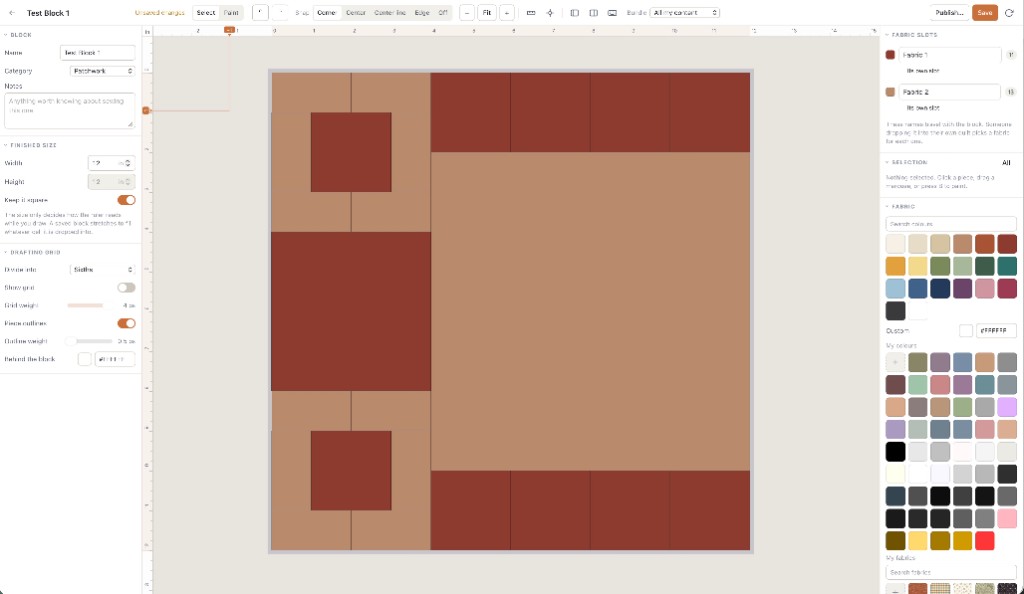
Quiltler’s browser studio lets you arrange built-in blocks and create custom shapes and blocks with the Cut Designer. That makes it useful when you want to build a quilt rather than only preview color substitutions. The quilt block library shows the kinds of traditional structures you can use, while the online quilt designer explains the browser workflow.
PreQuilt offers a Block Maker, SVG block imports, and a Tracer that puts an image behind a block or quilt as a drafting guide. Dedicated on-point and triangle grids help with layouts that do not fit a standard horizontal grid.
PreQuilt has the clearer documented advantage for automated experimentation. Magic Quad, color randomization, randomized blocks, and randomized block rotation can reveal combinations you might not build manually. Choose it over Quiltler if these generative layout tools or SVG imports are central to your process.
Photographed Fabric, Printed Swatches, and Color Libraries
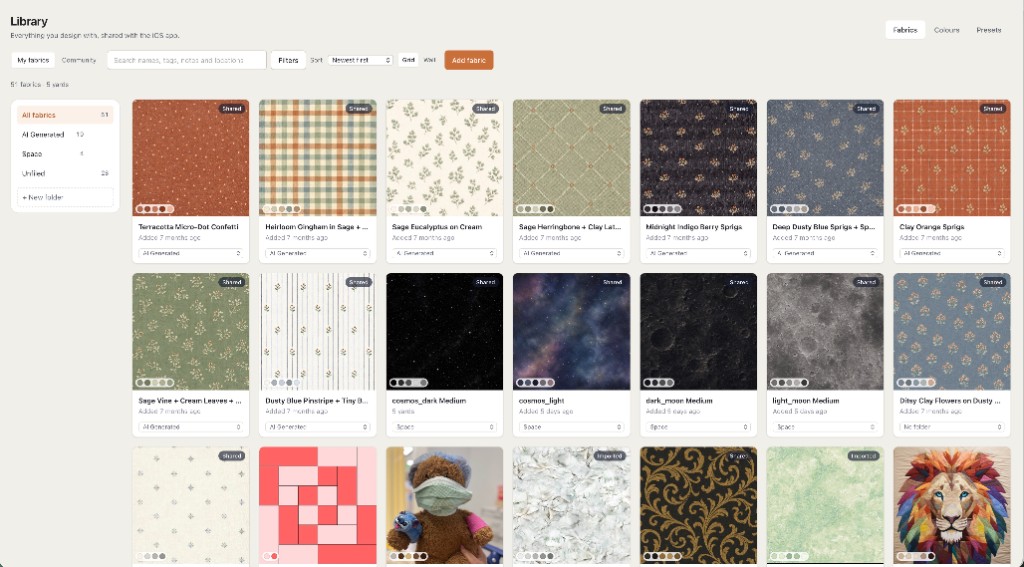
Quiltler is built around fabric you already own. You photograph your stash, organize it in the fabric library, and audition those fabrics in a layout. This is useful when your main question is not simply which color works, but which actual print on your shelf should go into each piece.
Print scale still matters because a large motif can look very different after cutting. The fabric print scale guide explains how to display imported motifs at real-world size, while cuts versus fabrics explains how a design’s structure affects calculated yardage.
PreQuilt supports scaled printed swatches and has the advantage of documented manufacturer solid-color cards. Those references make it a strong choice when you plan with named solids from Robert Kaufman, Art Gallery Fabrics, Riley Blake Designs, or FreeSpirit instead of photographing a personal stash.
The free-level difference is important. Quiltler allows an unlimited fabric library, while PreQuilt’s free level lists zero stored fabrics and does not allow free coloring-page visitors to use printed swatches.
Yardage, Cutting Instructions, Templates, and Pattern Output
A yardage total tells you how much fabric a design uses. Construction output tells you what shapes to cut, how large to cut them, and how the parts fit together. That distinction matters if you want software to carry a project beyond color planning.
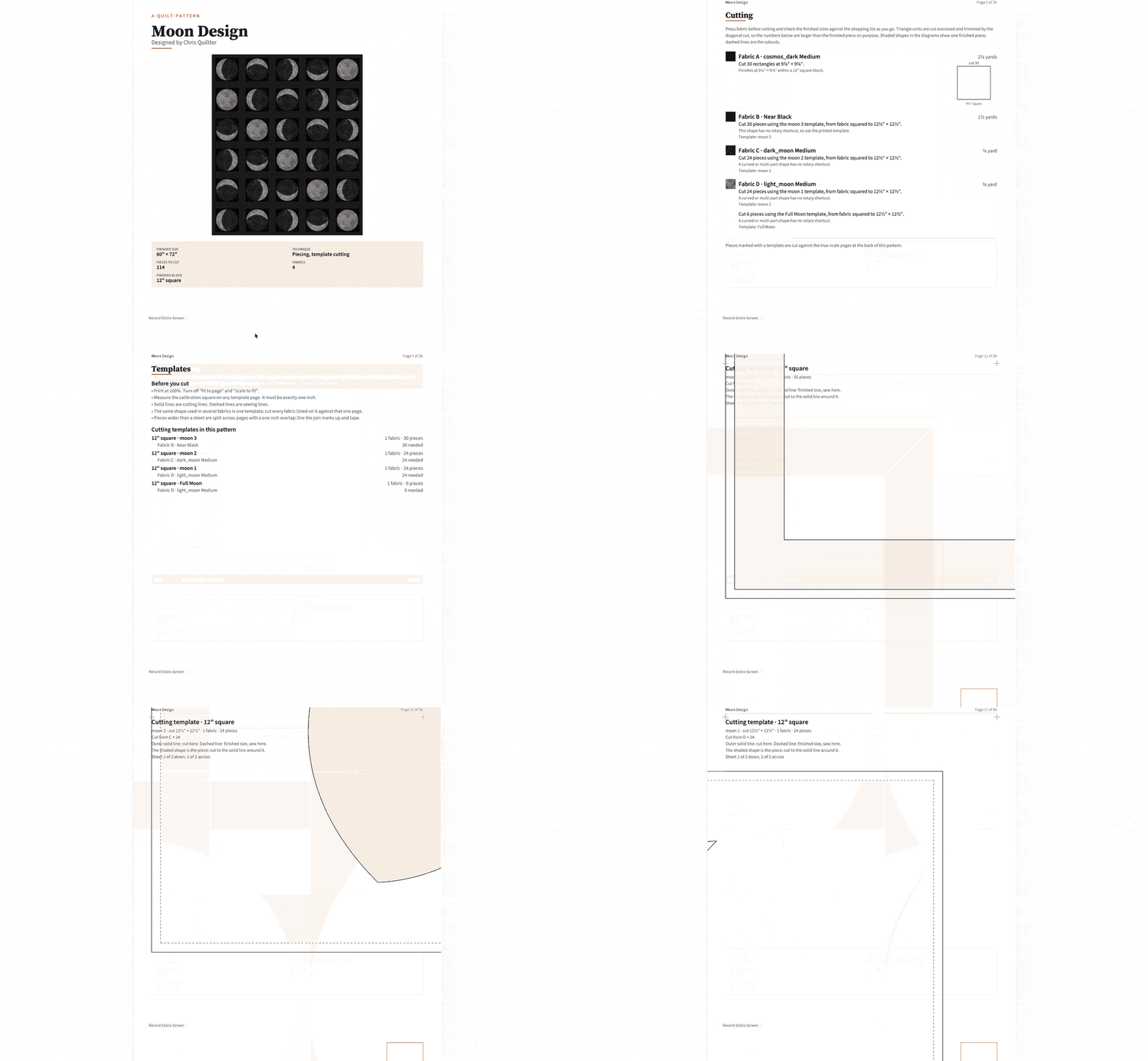
Quiltler calculates fabric and yardage automatically and exports a cutting summary as a PDF. Its subscription pattern pack adds a shopping list, rotary-size cutting chart, assembly map, and true-scale templates. You can also use the site’s free quilt fabric calculator for a separate yardage check.
PreQuilt provides fabric calculations with block breakdowns and width-of-fabric cutting diagrams. Those block-level and WOF views are a genuine advantage when they match the way you plan cuts. However, PreQuilt states that its fabric calculator does not calculate fabric requirements for designer coloring pages, so do not assume every interactive coloring page includes yardage.
Quiltler has the more connected construction workflow for marketplace patterns because a purchased pattern opens in the studio for recoloring, resizing, and refabricing before producing its associated materials.
Browser, iPad, Phone, Cloud, and Learning Experience
Quiltler’s main design studio runs in a modern browser on Windows, Mac, and Chromebook. Its companion app supports iPhone and iPad with iOS or iPadOS 18.5 or later, Apple-silicon Macs, and Apple Vision Pro. The iPad interface is touch-first and works with a finger or Apple Pencil; the iPad quilting app guide covers that workflow in detail.
Projects sync through a signed-in Quiltler account and across Apple devices with iCloud. The App Store rating is 4.8 stars from quilters. Quiltler also provides free design video tutorials, calculators, block guides, and quilting tutorials.
PreQuilt officially supports PCs, Macs, tablets, and mobile phones through a browser, with projects saved in the cloud. A native iOS or Android app could not be confirmed. Its official material acknowledges a learning curve, but it backs the product with screenshot-based guides, tutorial videos, and a free 11-module introductory course.
The reviewed information does not confirm what happens to PreQuilt when an internet connection is lost. Do not choose either browser workflow on the assumption that it will operate offline unless you have verified that behavior for your device and task.
Use Quiltler in your browser on a desktop for the main design workflow, then continue through the touch-first companion app on a supported iPhone or iPad.
Publishing and Selling Patterns
Quiltler connects creation, discovery, purchase, editing, and construction. Subscribers can publish and sell patterns in the integrated pattern marketplace, while buyers can open a purchased pattern in the studio to recolor it, resize it, and replace its fabrics. The community feed also supports sharing designs and custom cuts, with a creator spotlight for discovery.
PreQuilt Market takes a different approach. Designers can publish public or private interactive coloring pages and add a custom call to action leading to an existing shop. Private pages can support pattern testers, memberships, or unreleased material.
PreQuilt does not sell the associated patterns inside its own application; customers follow the designer’s link to an external storefront. That can be preferable if you already have an established ecommerce system and want PreQuilt to serve as an interactive preview. Quiltler is preferable when you want the marketplace purchase to open directly in an editable design environment.
Quiltler Strengths and Limitations
What works about Quiltler
- Design and recolor without limits on the free tier
- Save one quilt and store unlimited fabrics free
- Photograph and audition a real fabric stash
- Automatic yardage and PDF cutting summary
- Pattern packs with charts, maps, and templates
- Native touch-first iPhone and iPad companion
- Integrated editable-pattern marketplace and community
Where it falls short
- Free users can save only one quilt
- Complete pattern packs require a subscription
- Publishing and pattern sales require a subscription
- Native companion app is limited to supported Apple devices
- Companion app requires iOS or iPadOS 18.5 or later
PreQuilt Strengths and Limitations
What works about PreQuilt
- Manufacturer solid-color reference cards
- Scaled printed fabric swatches
- Magic Quad and multiple randomization tools
- Block Maker, SVG imports, and image tracing
- Dedicated on-point and triangle grids
- Public and private interactive coloring pages
- Formal guides, videos, and introductory course
Where it falls short
- Free level includes zero saved quilts
- Free level includes zero stored fabrics
- Free coloring progress cannot be saved
- Current numerical checkout prices remain unconfirmed
- Native mobile application could not be confirmed
- Designer coloring pages lack fabric calculations
- Official material acknowledges a learning curve
Choose Quiltler or PreQuilt by Workflow
The right choice follows the job you need to complete. Quiltler covers more of the path from a personal fabric photograph or original shape to yardage, cutting documents, an editable purchase, and an integrated sale. PreQuilt has narrower areas where its documented tools are the better match.
- Choose Quiltler for casual designing if you want to create freely, store unlimited fabrics, see yardage, and save a first quilt without paying.
- Choose Quiltler for a photographed stash if you want to audition the actual prints and fabrics you own.
- Choose Quiltler for iPad work if finger and Apple Pencil input in a native companion app matter to you.
- Choose Quiltler for construction output if you need rotary cutting sizes, assembly maps, shopping lists, and true-scale templates in a pattern pack.
- Choose Quiltler for integrated pattern sales if you want buyers to purchase a pattern and open it directly in the design studio.
- Choose PreQuilt for manufacturer solids if built-in reference cards from its documented fabric brands are central to your planning.
- Choose PreQuilt for automated experimentation if Magic Quad, randomized color, blocks, or rotation are important to your design process.
- Choose PreQuilt for specialist drafting if you specifically need SVG block imports, image tracing, or dedicated on-point and triangle grids.
- Choose PreQuilt for an external-shop workflow if you already have a storefront and want interactive coloring pages to direct customers there.
- Choose PreQuilt for private previews if you need coloring pages for testers, memberships, or material that has not been released.
The Bottom Line
Quiltler is the best overall choice for most makers and commercial pattern designers in this comparison. That conclusion rests on concrete workflow differences: its free tier saves a real project and unlimited fabrics, its Apple companion is touch-first, its output extends from yardage to construction documents, and its marketplace patterns remain editable after purchase.
PreQuilt should still be your choice when manufacturer color cards, randomization, SVG importing, tracing, specialized grids, or external-store coloring pages matter more than integrated construction and sales. Those are meaningful advantages, not minor extras. For the broadest route from original idea to finished pattern, however, Quiltler connects more of the necessary tasks in one workflow.
Related Quilt Design Guides
Quilt Design Software
See how browser design, fabric calculations, cutting instructions, and the mobile companion fit together.
How to Design a Quilt
Plan size, blocks, layout, color, fabric, and construction from the first idea.
Best Quilt Design Apps
Compare additional quilt-design tools across desktop, browser, iPhone, and iPad workflows.