The right website depends on the job in front of you. Fabric shops help you buy materials, pattern publishers give you established projects and instruction, and design studios let you create or visualize the quilt itself. If you are starting your first project, the beginner quilting guide explains how these jobs fit into the complete process.
On this page
Best quilting websites at a glance
No single site leads every category. Quiltler is the design pick, while the stores and pattern publishers are better choices when you need fabric, a kit, an established pattern or guided instruction.
| Feature | Quiltler | PreQuilt | Fat Quarter Shop | eQuilter | Missouri Star | Keepsake Quilting | American Patchwork & Quilting | Suzy Quilts |
|---|---|---|---|---|---|---|---|---|
| Best use | Original design, stash auditioning and cutting plans | Browser-based block design and coloring pages | Fabric, kits, precuts and supplies | Fabric shopping across many material categories | Precuts, supplies and video tutorials | Kits, wide backing and free downloads | Editorial patterns and technique articles | Patterns, sew-alongs and quilting education |
| Cost to start | Free for up to 3 quilts and 5 fabrics | Free demo and public coloring pages; Basic is $7.50 monthly or $50 yearly | Free to browse; products individually priced | Free to browse; purchases individually priced | Free browsing and tutorials | Free browsing and pattern collection | Free website access | Free projects and articles; individual pattern prices vary |
| Platform | Modern browsers plus native Apple apps | Web on PCs, Macs, tablets and mobile phones | Browser-based store | Browser-based store | Browser-based store plus 13 Hamilton shops | Browser-based store | Browser-based editorial site and print magazine | Browser-based pattern and education site |
| Important limitation | Native app is Apple-only; paid pricing is not listed here | Free plan lists no saved quilts or stored fabrics | Not an original-layout design studio | Shopping tools do not replace a complete custom design studio | Not a general-purpose quilt design application | Focused on shopping and existing patterns | Focused on established patterns and editorial content | Focused on patterns and instruction rather than original layout construction |
Use shops to buy fabric, pattern sites to learn and a dedicated design studio to create an original quilt.
Choose the best website for what you want to do
Start by naming the result you need before comparing websites. A site with thousands of products may be useful for shopping but still cannot turn your sketch into a workable cutting plan.
If you want to build an original layout, Quiltler is the strongest overall fit. You can review the full planning process in how to design a quilt, then open the Quiltler browser studio to begin.
- Design an original quilt: Choose Quiltler for a touch-first canvas, custom cuts, yardage calculations and a cutting-summary PDF. Consider PreQuilt when SVG importing, triangle grids, on-point grids or public coloring pages matter more.
- Audition fabric from your stash: Quiltler lets you photograph real fabric and place it in a layout. PreQuilt supports photographs of stash fabric on paid plans.
- Buy fabric with a kit or matching supplies: Fat Quarter Shop sells yardage, precuts, kits, notions, books and patterns. Keepsake Quilting is another useful choice for kits and wide backing.
- Shop for precuts: Compare Fat Quarter Shop and Missouri Star Quilt Company. Both sell precuts alongside patterns, kits and other supplies.
- Search across varied fabric types: eQuilter carries quilting cotton, batiks, hand dyes, backing, solids and precuts, and it ships worldwide.
- Find free written patterns: American Patchwork & Quilting offers broad pattern categories with an editorial review process. Keepsake Quilting lists more than 1,200 downloadable products priced at $0.
- Follow sew-alongs: Suzy Quilts combines downloadable patterns, free projects, Quilting 101 articles and sew-alongs.
- Learn through videos: Missouri Star provides thousands of free tutorials and publishes a new one each Friday. Fat Quarter Shop provides weekly tutorials alongside its free-pattern section.
Best websites for buying quilting fabric and supplies
Fat Quarter Shop is the most broadly useful shopping destination in this group. You can browse by designer, collection, manufacturer, theme or color, then shop for yardage, precuts, kits, notions, books and patterns. Standard US shipping is free on orders over $80.
Its optional Sew Sampler subscription has a $0.99 joining fee and costs $34.95 per month plus shipping. Choose Fat Quarter Shop when you want several kinds of quilting supplies in one order, not when you need to construct an original digital layout.
eQuilter is useful when your search spans quilting cotton, batiks, hand dyes, backing, solids and other categories. It includes a free pattern library, Pattern Designer and Design Board, but its main role is selling fabric. US orders of $100 or more receive free economy shipping, and the company also ships worldwide with a shipping discount on qualifying international orders.
Missouri Star Quilt Company combines an online shop with 13 themed physical shops in Hamilton, Missouri. It sells fabric, precuts, kits, patterns and tools, and it also offers longarm quilting services. Domestic standard shipping is free at $59 or more and costs $5.99 on orders up to $58.99.
Keepsake Quilting stands out for kits, wide backing, block-of-the-month programs and telephone customer support. Regular US shipping is free on orders over $75. Its optional $99.99 yearly KQ Gold Club includes rewards, member gifts and free continental-US shipping on orders over $35, so its value depends on how often you order.
These stores complement Quiltler rather than compete with it. Plan the layout and quantities in a design studio, then use a shop to purchase the fabric, backing and supplies.
Best websites for free quilt patterns and tutorials
American Patchwork & Quilting, also known through AllPeopleQuilt, is a strong starting point when you want an established free pattern. Its collections include beginner, baby, bed, block, precut, scrappy and table-runner projects. The publisher says its patterns and articles are reviewed by editors, copy editors, quilt testers and technical editors.
Suzy Quilts is better suited to readers who want its downloadable patterns, Quilting 101 material and guided sew-alongs. The Cutting Table membership costs $12.99 per month or $129.99 per year and includes a monthly pattern download, three monthly tutorials or articles, a block of the month, discounts and past issues. There is no separate free trial, and downloaded subscriptions are non-refundable.
The major shops also have useful educational libraries. Fat Quarter Shop combines weekly tutorials with free patterns, Missouri Star emphasizes presenter-led video instruction, eQuilter includes a free pattern library and Keepsake Quilting lists more than 1,200 free downloads. For individual block practice, Quiltler also maintains a free quilt block pattern library.
Best website for designing your own quilt
Selecting an existing pattern is different from constructing the layout yourself. An original design may require you to set dimensions, arrange blocks, create custom shapes, test fabrics, calculate quantities and translate the result into cutting instructions.
Quiltler brings those tasks into one workflow. The Cut Designer creates shapes and blocks beyond the built-in library, while the fabric library lets you photograph your stash and audition it in the design. Quiltler then calculates fabric and yardage automatically and exports a cutting summary as a PDF.
Patterns bought through the Quiltler pattern marketplace open inside the studio, where you can recolor, resize and re-fabric them. A pattern pack can include a shopping list, rotary cutting chart, assembly map and true-scale templates, bridging the gap between a digital layout and work at the cutting table.
The browser studio runs on Windows, Mac, Chromebook, Android and iPad through a modern browser. Native apps are available for iPhone, iPad, Apple Silicon Mac and Apple Vision Pro, with a touch-first canvas and Apple Pencil support on iPad. Quiltler is rated 4.8 stars by quilters on the App Store.
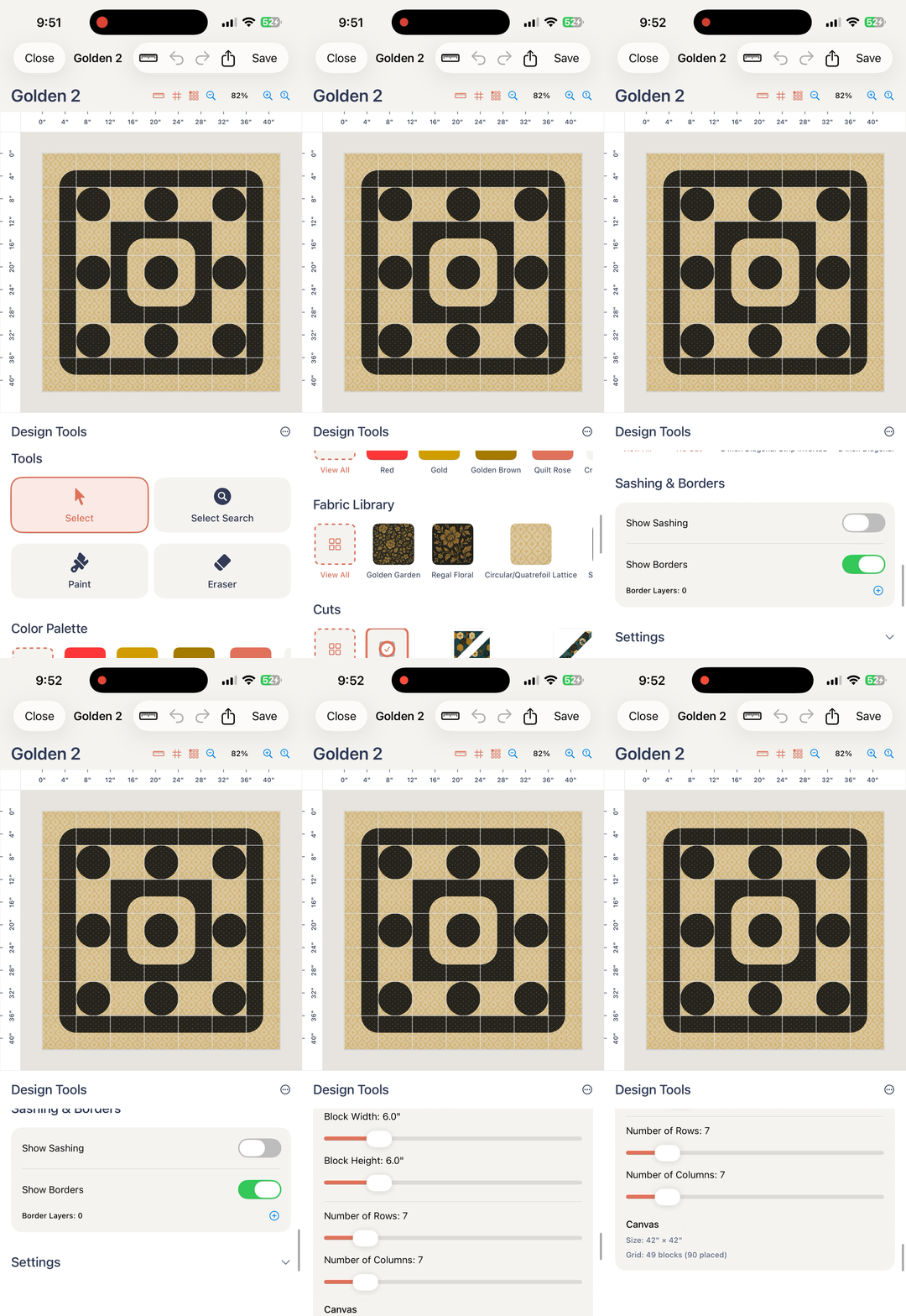
Quiltler is free to start with up to three quilts and five fabrics, giving you saved projects and a practical way to test the design workflow.
Quiltler vs. PreQuilt
PreQuilt is the substantive alternative for browser-based quilt design. Its application works on PCs, Macs, tablets and mobile phones, while Quiltler combines broad browser access with native Apple apps. Both provide yardage and cutting guidance, but their free access and specialist tools differ.
Quiltler’s free tier includes up to three saved quilts and five fabrics. PreQuilt’s free access consists of a demo and public coloring pages using solid colors, with zero saved quilts and zero stored fabrics listed on the free plan. PreQuilt Basic costs $7.50 monthly or $50 yearly for up to 50 quilts and 250 patterned swatches; its Market plan costs $10 monthly or $100 yearly with unlimited quilt and fabric storage.
PreQuilt is genuinely stronger when you need SVG imports, dedicated triangle and on-point grids, randomization tools, preloaded manufacturer color cards or public digital coloring pages. Its Market plan also supports designer sales links. A designer publishing interactive coloring pages may reasonably prefer PreQuilt.
Quiltler is the better fit when you want finger or Apple Pencil control, saved free projects, photographed stash fabrics, custom shapes through Cut Designer and editable marketplace patterns. Its automatic yardage, cutting-summary PDF and pattern-pack outputs make it the strongest choice for taking your own idea toward a makeable quilt. For a wider tool comparison, see the best quilt design apps.