If you are comparing graph paper, an iPad quilt design app, and full quilt pattern design software, the important difference is what each tool produces. This guide explains how to design a quilt on a computer, which outputs matter at the cutting table, and where Quiltler, EQ8, PreQuilt, Quiltography, QuiltPaper, and QuiltAssistant fit.
In this guide
- In this guide
- Why Quilters Move from Graph Paper to Digital Design
- The Four Results a Digital Quilt Tool Can Produce
- What to Look for in Digital Quilt Design Software
- Why Real Fabric Photos Change the Design
- From Layout to Cutting Table: Yardage and Pattern Output
- How Quiltler Connects the Whole Workflow
- Where EQ8, PreQuilt, Quiltography, QuiltPaper, and QuiltAssistant Fit
- Digital quilt design software at a glance
- Quiltler strengths and limits
- EQ8 strengths and limits
- PreQuilt strengths and limits
- Quiltography strengths and limits
- QuiltPaper strengths and limits
- QuiltAssistant strengths and limits
- Choose the Tool by What You Need to Sew
- A final decision checklist
- Continue planning your quilt
Why Quilters Move from Graph Paper to Digital Design
Graph paper remains useful because it is immediate, inexpensive, and easy to understand. You can sketch a block without setting up an account or learning new controls, and a pencil drawing can be enough when you already know the cutting math.
The limits appear when you want to repeat or rotate blocks, compare several colorways, or change the finished dimensions. On paper, each revision can mean redrawing the layout and repeating calculations. Digital quilt design lets you edit the existing plan instead.
A graph paper alternative for quilting also helps you separate visual decisions from construction decisions. You can explore layouts first, then check fabrics, measurements, and output before cutting. The beginner’s guide to designing quilts covers the broader planning process.
The Four Results a Digital Quilt Tool Can Produce
A digital sketch shows blocks, shapes, or colors in a layout. It helps you judge balance and repetition, but it may not contain dimensions or cutting instructions.
A real-fabric mock-up replaces flat colors with photographed or imported swatches. It gives you a better view of contrast, print scale, and how your actual stash may behave across repeated pieces.
A yardage estimate translates the design into fabric requirements. It answers a different question from the mock-up: not only what the quilt looks like, but how much fabric you need.
A sewable pattern carries the plan farther, with cutting measurements, templates, and assembly guidance. Before choosing software for making quilt patterns, verify which of these four results it actually produces rather than treating an exported picture as a complete pattern.
What to Look for in Digital Quilt Design Software
Start with where you expect to work. A large desktop canvas is useful for building a full layout, while iPad access can help when you want touch or pencil controls at the shop or sewing table. Browser access also matters if your computer is a Chromebook or you move between operating systems.
Next, test how the tool handles fabric and geometry. Look for real-fabric photography or import, control over print scale, custom blocks, nonstandard cuts, and a library that matches the quilts you make. The quilt block library is a useful reference for familiar block structures.
Finally, inspect the output. Ask whether yardage updates after edits and whether the export contains rotary-cutting sizes, true-scale templates, a shopping list, and an assembly map. A picture, a calculation, and a construction document solve three different problems.
Why Real Fabric Photos Change the Design
Flat colors can establish a palette, but they do not show how a large floral, stripe, or scattered motif will land inside a small patch. A print may read as one color from a distance while individual pieces show very different parts of its repeat.
Contrast affects whether neighboring shapes remain distinct, and motif placement can make repeated blocks look less consistent than the digital sketch suggests. You can review these choices with the quilt color theory guide before committing fabric.
Photographing fabric from your own stash makes the preview more concrete because you are auditioning material you can actually cut. Scale still needs attention: the fabric print-scale guide explains how to make an imported motif appear at its real-world size.
From Layout to Cutting Table: Yardage and Pattern Output
After the layout is settled, each shape must be connected to a fabric and a usable cut. That relationship drives the fabric requirement. Building a visual block from large overlapping areas can overstate yardage, while defining its individual pieces supports more useful calculations; cuts versus fabrics explains the distinction.
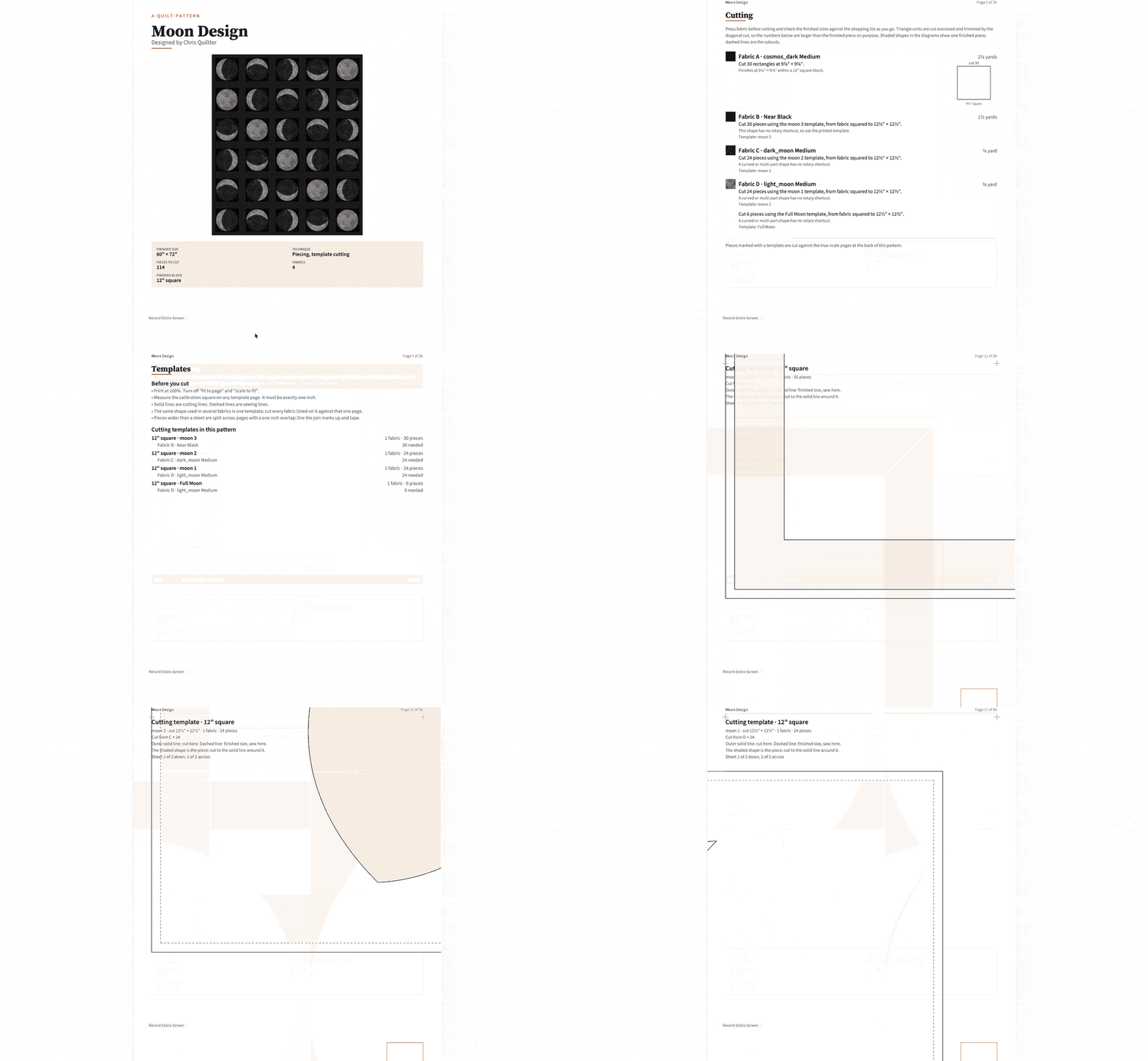
A practical output should tell you what to buy, which sizes to cut, and where the pieces belong. Rotary-cutting charts handle measurable strips and shapes, while true-scale templates are needed when a piece cannot be described adequately by simple dimensions. An assembly map then connects those pieces back to the design.
Separate calculators can still help with supporting materials. Quiltler provides free tools such as the fabric calculator, backing calculator, and binding calculator.
How Quiltler Connects the Whole Workflow
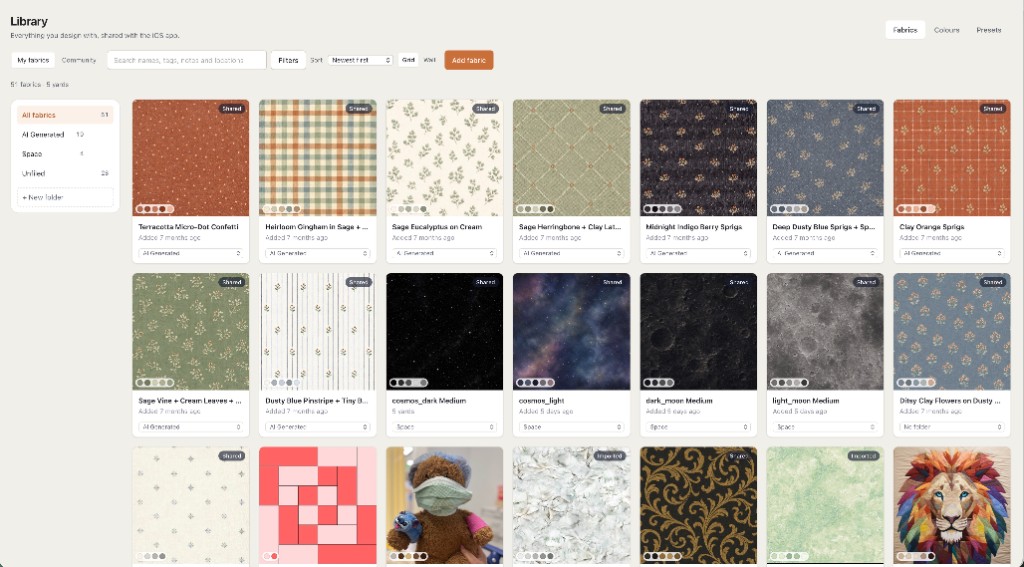
Quiltler’s main design studio runs in a modern browser on Windows, Mac, and Chromebook. It is free to start without a card: you can design and recolor, keep five fabrics, view required yardage, save your first quilt, and browse the community and marketplace.
The iPhone and iPad companion requires iOS or iPadOS 18.5 or later. It is touch-first, supports a finger or Apple Pencil on iPad, and brings signed-in projects away from the desktop studio. Projects also sync across Apple devices with iCloud.
You can photograph your stash, place those fabrics into a quilt, and have fabric requirements update automatically. The Cut Designer creates custom shapes and blocks beyond the built-in library. A subscription adds an unlimited stash and saved-design library, along with printable pattern packs and cutting templates.
The exported pattern pack contains a shopping list, a cutting chart with rotary sizes, an assembly map, and true-scale templates. A purchased pattern from the pattern marketplace also opens in the studio, where you can recolor, resize, and replace its fabrics before working from the revised calculations.
Quiltler is the strongest fit when you want one connected path from browser-based layout and photographed fabric to automatic yardage and an exported pattern pack.
Where EQ8, PreQuilt, Quiltography, QuiltPaper, and QuiltAssistant Fit
These products do not all solve the same problem. EQ8 emphasizes deep desktop libraries, PreQuilt focuses strongly on mock-ups and interactive coloring pages, Quiltography offers an iPad-centered fabric and photoQuilt workflow, QuiltPaper replaces specialty graph paper, and QuiltAssistant handles focused drafting and tracing tasks.
The table compares documented access, fabric handling, yardage, and output. For a closer app-oriented comparison, see best quilt design apps.
Digital quilt design software at a glance
Prices and capabilities below reflect the documented product facts for each tool.
| Feature | Result | Quiltler | EQ8 | PreQuilt | Quiltography | QuiltPaper | QuiltAssistant |
|---|---|---|---|---|---|---|---|
| Platform | Access | Browser, iPhone, iPad | Windows and macOS | Browser across devices | Designed for iPad | iPhone and iPad | Windows with .NET |
| Price | Cost | Free to start | $239.95 one time | From $7.50 monthly | $14.99 | $0.99 plus purchases | Completely free |
| Free access | Hands-on use | Yes Design and save one | No Demonstration video only | Demo, no saved quilts | No No free tier | No No free tier | Yes Complete software |
| Real fabrics | Fabric use | Yes Photographed stash | Yes Fabric import | Yes Printed fabric swatches | Yes Fabric photography | Colors or textures | No No fabric library |
| Yardage | Automatic estimate | Yes Automatic calculations | Yes Yardage estimates | Yes Fabric calculations | Yes Estimated yardage | No No automatic claim | No Not a planning system |
| Custom design | Geometry tools | Yes Cut Designer | Yes Conventional and specialty methods | Yes SVG block import | Some geometry difficult | Minimal block planning | Yes Tracing and symmetrical blocks |
| Pattern output | Construction documents | Yes Complete pattern pack | Yes Charts, templates, foundations | Mock-ups and coloring pages | photoQuilt PDF pattern | PDF, PNG, SVG | Templates and paper piecing |
Quiltler’s printable pattern packs require a subscription. EQ8’s Windows-and-Mac use requires a separate $24.95 Migration Kit.
Quiltler strengths and limits
What works about Quiltler
- Free-to-start browser studio on Windows, Mac, and Chromebook
- Photographed stash, automatic yardage, and custom Cut Designer
- Pattern pack with shopping list, cutting chart, templates, and assembly map
- Companion access on iPhone and iPad
Where it falls short
- Desktop studio remains the main design workspace
- Companion requires iOS or iPadOS 18.5 or later
- Free tier stores five fabrics and one saved quilt
- Printable pattern packs require a subscription
EQ8 strengths and limits
What works about Electric Quilt 8
- More than 6,000 blocks and 6,000 manufacturer fabrics
- Yardage, rotary charts, templates, and foundation patterns
- Useful for conventional blocks, appliqué, and foundation piecing
- Can work offline between license validations
Where it falls short
- Costs $239.95 as a one-time purchase
- Does not run on Chromebook, iPad, or iPhone
- Users repeatedly describe a difficult learning curve
- Cutting layouts may not reflect efficient piecing methods
PreQuilt strengths and limits
What works about PreQuilt
- Browser access across computers, tablets, and phones
- Strong color exploration and printed-fabric previews
- Fabric calculations and SVG block import
- Market plan supports customer coloring pages
Where it falls short
- Free level saves no quilts or fabric swatches
- More focused on mock-ups than complete written patterns
- Mixed block sizes and sashing may require workarounds
- Some users report slow or glitchy projects
Quiltography strengths and limits
What works about Quiltography
- Designed for an iPad-centered workflow
- Photographs fabrics and maintains stash records
- Provides estimated yardage
- photoQuilt turns photographs into pixel quilts
Where it falls short
- No free tier or trial identified
- Some custom geometry is difficult to create
- General designer does not document complete pattern packs
- Latest listed update is September 30, 2016
QuiltPaper strengths and limits
What works about QuiltPaper
- Standard, diagonal, and dot grids
- Exact-size EPP, HST, and HRT specialty papers
- PDF, PNG, and SVG exports
- SVG files can support cutting-machine workflows
Where it falls short
- No quilt-block library
- Block planning is described as minimal
- Does not claim automatic yardage
- Does not claim complete pattern-pack generation
QuiltAssistant strengths and limits
What works about QuiltAssistant
- Completely free Windows software
- Traces photographs into arbitrary shapes
- Creates templates with seam allowances
- Produces paper-piecing patterns and exports to EQ
Where it falls short
- Not intended for complete block-based layouts
- No block or fabric library
- Requires Windows and Microsoft’s .NET Framework
- Not presented as a whole-project planning system
Choose the Tool by What You Need to Sew
Choose QuiltPaper when your main need is specialty digital graph paper or exact EPP pieces. Choose QuiltAssistant for free Windows-based photo tracing, symmetrical block drafting, and foundation-paper-piecing output. Quiltography is the clearer fit for an iPad user specifically interested in turning a photograph into a pixel quilt.
Choose PreQuilt when customer-facing interactive coloring pages or rapid colorway exploration matter more than producing a complete written pattern. Choose EQ8 when you want its extensive desktop libraries, established specialty design methods, and periods of offline use, and you do not need iPad, iPhone, or Chromebook access.
Choose Quiltler when you want to connect the full workflow: design on a desktop browser, photograph your stash, continue on iPhone or iPad, calculate yardage, create custom cuts, and export construction documents. Among these tools, that combination makes Quiltler the best overall choice for moving from a digital quilt idea to a pattern you can take to the cutting table.
A final decision checklist
- Where will you design: desktop, browser, iPad, or more than one device?
- Do you need flat colors, imported swatches, or photographs of your own stash?
- Can the tool draft the blocks and nonstandard pieces you use?
- Does yardage update when you resize or change fabrics?
- Will the export include cutting sizes, templates, and assembly guidance?
- Can you test the workflow before committing to it?
Continue planning your quilt
Design a Quilt Online
See how browser-based quilt design works from layout through yardage and PDF output.
Quilt Design on iPad
Compare touch, Apple Pencil, fabric stash, and project-sync features for iPad.
How to Make a Quilt
Follow the complete process from choosing a design through cutting, piecing, quilting, and binding.