If you want free quilt design software, the important question is not simply whether a tool opens without payment. You need to know if you can create an original quilt, use your own fabric, save your work and produce enough information to sew it. This guide compares eight tools using those practical limits.
What this guide covers
- What this guide covers
- What “free quilt design software” actually means
- What you can do with Quiltler for free
- What a Quiltler subscription adds
- Free quilt design software compared at a glance
- Best free tools for original quilts and printable output
- Quiltler strengths and limits
- NiftyFifty strengths and limits
- Best free tools for recoloring existing patterns
- GO! Quilt strengths and limits
- QuiltInk strengths and limits
- Best free tools for stash photos, photo quilts and paper piecing
- PatternJam strengths and limits
- QuiltAssistant strengths and limits
- Free demos, trials and the paid desktop alternative
- PreQuilt strengths and limits
- Electric Quilt 8 strengths and limits
- Which quilt design tool fits your project?
- Choose by the job you need to do
- Keep planning your quilt
What “free quilt design software” actually means
Free can describe several different arrangements. Some programs are completely free, some have a permanent but limited free tier, and others provide only a demo or short trial. A paid program may also offer a watchable demonstration without providing software you can install and test.
The distinction matters because recoloring a hosted pattern is not the same as drafting an original quilt. Saving a mock-up is also different from receiving yardage, cutting charts, templates and assembly instructions. The comparison below separates those jobs instead of treating every online quilt maker as equivalent.
What you can do with Quiltler for free
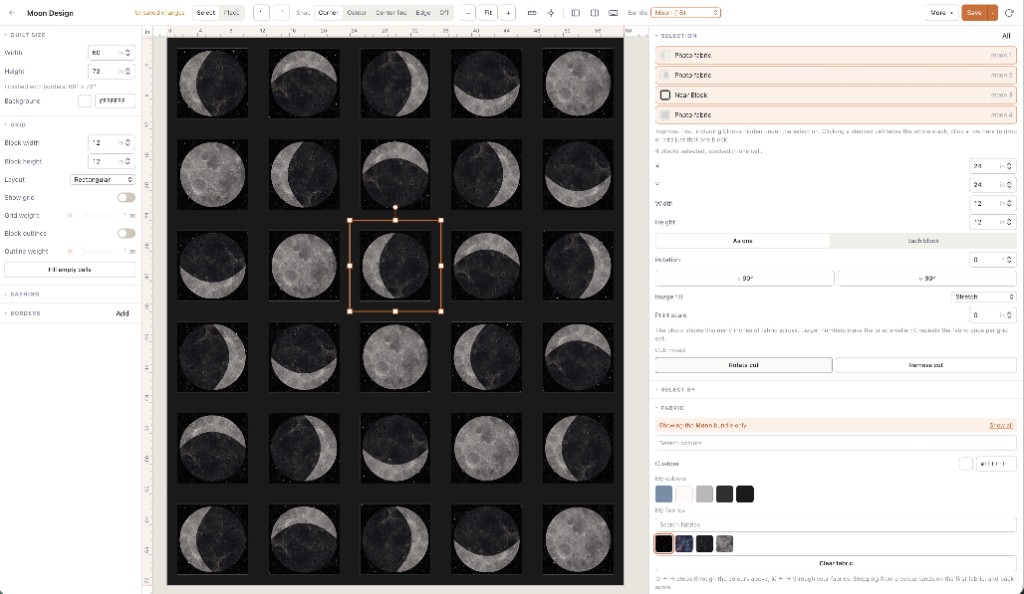
Quiltler is free to start without entering a card. You can design and recolor as much as you like, keep five fabrics in your stash, save one quilt and see the yardage totals for that design. You can also browse community designs and patterns in the marketplace.
The main studio runs in a modern browser on Windows, Mac and Chromebook. An iPhone and iPad companion supports touch and Apple Pencil input, while signed-in projects can sync across devices. If you are new to digital drafting, the online quilt designer guide explains the browser workflow.
The free tier is useful for developing one original project, not for building a large design archive. Its yardage total helps you evaluate fabric needs, but printable pattern packs and cutting templates are subscription features. The guide to cuts, fabrics and yardage explains why the way you construct a block affects the calculation.
What a Quiltler subscription adds
A subscription removes the one-quilt and five-fabric limits, giving you an unlimited library of saved designs and an unlimited fabric stash. It also adds community imports, publishing and the ability to sell patterns. No subscription price is stated here because a verified current price was not included in the available product information.
Paid pattern packs contain a shopping list, a rotary cutting chart, an assembly map and true-scale templates. You can also export a PDF cutting summary. This is the point where Quiltler changes from a free design-and-yardage workspace into a fuller design-to-construction and publishing workflow.
Use Quiltler free when you want to develop one original quilt and check yardage. Subscribe only when you need more saved projects, more than five stash fabrics, printable construction output or publishing tools.
Free quilt design software compared at a glance
The table focuses on what you can do before paying, while identifying paid-only output where that distinction matters.
| Feature | Quiltler | PreQuilt | NiftyFifty | GO! Quilt | PatternJam | QuiltInk | QuiltAssistant | EQ8 |
|---|---|---|---|---|---|---|---|---|
| Platform | Browser; Apple companion | Browser | Browser | Browser | Online service | Browser | Windows download | Windows or macOS |
| Payment model | Free tier + subscription | Free demo + plans | Completely free | Completely free | Free service | Free account + paid roles | Completely free | $239.95 one-time purchase |
| Account requirement | No card needed | No account for coloring | No account to start | Browser workflow | Registration required | No account for public patterns | Downloaded software | Licensed software |
| Original design | Yes Yes | Designer demo | Yes Yes | No No | Online quilt design | No No | Blocks and FPP | Yes Yes |
| Free saved projects | One quilt | Zero quilts | No account to start | Existing-pattern projects | Private or public designs | Saved drafts with account | Local Windows files | Paid desktop files |
| Fabric uploads | Five photographed fabrics | Zero stored free fabrics | Real fabric libraries | Stash swatches | Stash photographs | Ten printed fabrics | No fabric library | Imported fabrics |
| Yardage | Automatic free totals | Fabric calculations | Per-fabric cutting charts | Fabric list | Stash design workflow | Pattern recoloring | Template-focused workflow | Yardage estimates |
| Cutting output | Subscription pattern pack | Fabric calculations | Free cutting charts | Free cutting directions | Online design service | Mock-up exports | Seam-allowance templates | Rotary-cutting charts |
| Templates | Paid true-scale templates | Palette design tools | Free true-size templates | Existing pattern instructions | Manufacturer fabric libraries | Hosted pattern shapes | Printed FPP templates | Templates and foundations |
| PDF or image export | Paid pattern-pack PDF | Designer workflow | Free pattern PDFs | Downloadable instructions | Private or public sharing | Free PNG and PDF | Electric Quilt export | Construction output |
PreQuilt’s official help material lists Basic at $7.50 monthly or $50 yearly and Market at $10 monthly or $100 yearly, but those figures should be checked again before purchase. QuiltInk offers a five-day trial when first subscribing to certain paid roles. EQ8 has an official video demonstration, but an installable trial was not confirmed.
Best free tools for original quilts and printable output
Quiltler provides the strongest balance when you want to keep developing an original quilt without paying immediately. You can save the first project, audition five photographed fabrics and see automatic yardage. Its Cut Designer also creates custom shapes and blocks beyond the built-in quilt block library.
NiftyFifty is the better free choice when printable construction output is the deciding factor. It advertises free cutting charts, true-size templates and pattern PDFs, while Quiltler reserves comparable pattern-pack output for subscribers. NiftyFifty runs in a browser without an account, but it does not have a native mobile app.
Quiltler strengths and limits
What works about Quiltler
- Ongoing original design and recoloring
- One saved quilt on the free tier
- Five photographed stash fabrics
- Free automatic yardage totals
- Browser studio plus Apple companion
Where it falls short
- Pattern packs require a subscription
- Cutting templates require a subscription
- Free library limited to one quilt
NiftyFifty strengths and limits
What works about NiftyFifty Designers
- Completely free browser designers
- No account needed to start
- Free cutting charts and pattern PDFs
- Free true-size templates
Where it falls short
- No native mobile app
- Smaller library than EQ8
Best free tools for recoloring existing patterns
GO! Quilt is a strong fit when you plan to make one of its hundreds of existing patterns. You can recolor the project, upload stash swatches and download instructions with a fabric list, cutting directions, sewing directions and finishing guidance at no charge.
QuiltInk is better suited to patterns hosted by participating designers. Public patterns can be recolored without an account and exported as PNG or PDF mock-ups. A free account adds saved drafts, community sharing and space for ten uploaded printed fabrics, which is twice Quiltler’s free fabric allowance.
GO! Quilt strengths and limits
What works about GO! Quilt
- Completely free browser tool
- Hundreds of existing patterns
- Stash-swatches supported
- Customized construction instructions
Where it falls short
- Starts from existing patterns
- Not unrestricted original drafting
QuiltInk strengths and limits
What works about QuiltInk
- Free public-pattern recoloring
- Free PNG and PDF mock-ups
- Ten printed fabrics with account
- Saved drafts and community sharing
Where it falls short
- Limited to hosted patterns
- Pattern uploading requires a paid role
Best free tools for stash photos, photo quilts and paper piecing
PatternJam lets registered users photograph and upload fabrics, keep designs private or share them publicly. It can suit you if free stash auditioning and community sharing are enough, although its help page warns that its instructional video is somewhat out of date.
QuiltAssistant is the specialist choice for tracing a photograph into irregular pieces or drafting foundation paper-piecing designs on Windows. It prints templates with seam allowances and can export to Electric Quilt. Its developer says it is not intended for complete block-based quilt layouts, and it includes neither a fabric library nor a block library.
Quiltler is broader when you want photographed stash fabrics inside a whole-quilt workflow. You can learn how imported motifs behave at real size in the fabric print scale guide.
PatternJam strengths and limits
What works about PatternJam
- Free online design service
- Photographed stash uploads
- Private and public designs
- Manufacturer fabric libraries
Where it falls short
- Registration required
- Instructional video is partly outdated
QuiltAssistant strengths and limits
What works about QuiltAssistant
- Completely free Windows download
- Photo tracing into irregular pieces
- Foundation paper-piecing patterns
- Templates with seam allowances
Where it falls short
- Not intended for whole-quilt layouts
- No block or fabric libraries
- Requires Microsoft .NET Framework
Free demos, trials and the paid desktop alternative
PreQuilt’s free level is best treated as a demo rather than an ongoing free workspace. You can experiment with its browser designer and recolor designer coloring pages with solids without an account, but the free level saves zero quilts and stores zero fabrics. Its strengths include palette exploration, randomization, printed-fabric scaling and fabric calculations.
EQ8 is not free quilt pattern maker software. It costs $239.95 as a one-time Windows or macOS purchase and includes more than 6,000 copyright-free blocks, custom block drawing, layouts, yardage estimates, rotary-cutting charts, templates and foundation patterns. Choose it if you want a deep, subscription-free desktop package and its supported devices fit your setup; the EQ8 alternative guide compares that approach with Quiltler’s browser and companion workflow.
PreQuilt strengths and limits
What works about PreQuilt
- Broad browser and device support
- Palette randomization and exploration
- Printed-fabric scaling
- Fabric calculations
Where it falls short
- Zero free saved quilts
- Zero free stored fabrics
- Ongoing storage requires a paid plan
Electric Quilt 8 strengths and limits
What works about Electric Quilt 8
- More than 6,000 included blocks
- Custom layouts and block drawing
- Yardage, charts and templates
- One-time purchase
Where it falls short
- No free installable trial confirmed
- No Chromebook or mobile support
- Separate kit for both desktop platforms
Which quilt design tool fits your project?
No single program wins every category. Your best choice depends on whether you need original drafting, free construction output, hosted-pattern recoloring, photo tracing or a large traditional desktop package.
For most quilters seeking an ongoing original-design workflow, Quiltler is the best overall choice here. Its free tier combines one saved original quilt, five real-stash fabrics and automatic yardage, then provides a clear path to pattern packs, unlimited storage and publishing when you need them. You can start in the browser studio or review the broader desktop and companion workflow.
Choose by the job you need to do
- Choose Quiltler for original design, photographed stash auditioning, free yardage and cross-device work.
- Choose NiftyFifty when free cutting charts, templates and pattern PDFs matter most.
- Choose GO! Quilt for customizing an existing AccuQuilt project with complete instructions.
- Choose QuiltInk for recoloring hosted designer patterns and exporting free mock-ups.
- Choose PatternJam for a free registered design service with stash photographs and sharing.
- Choose QuiltAssistant for photo tracing or foundation paper piecing on Windows.
- Choose PreQuilt for palette experimentation and designer coloring pages.
- Choose EQ8 for advanced desktop drafting through a one-time purchase.