If you are trying to work out how much fabric a quilt needs, you are in the right place. This guide explains WOF, finished and cut sizes, fat quarters, piece-based calculations and the point at which a detailed cutting chart becomes more useful than a simple yardage estimate.
In this guide
- In this guide
- What quilt yardage actually measures
- What WOF means in a quilt pattern
- Finished size, unfinished size and cut size
- Why finished quilt size cannot price an exact pieced top
- Why some visual block calculations over-report fabric
- Fat quarters versus continuous yardage
- Choosing the right kind of yardage calculator
- Quiltler strengths and tradeoffs
- PreQuilt strengths and tradeoffs
- QuiltingCalc strengths and tradeoffs
- Quilter’s Paradise strengths and tradeoffs
- Quiltry strengths and tradeoffs
- Fabric Math Tools strengths and tradeoffs
- Where Quiltler’s cutting chart earns its keep
- Continue planning your quilt
What quilt yardage actually measures
Yardage is the length of fabric purchased from a bolt, not the finished length or width of your quilt. The usable width of that fabric determines how many strips or pieces can fit beside one another before you need more length.
The calculation changes with the quilt component. Finished quilt dimensions can help estimate backing, batting and binding, while a pieced top depends on its individual patches. You can use the backing calculator, batting calculator and binding calculator for those separate jobs.
For an exact top, you need to know each piece’s cut dimensions, quantity, orientation and assigned fabric. Those details create the fabric requirements for a quilt rather than a general size chart alone.
What WOF means in a quilt pattern
WOF means width of fabric. In a cutting instruction such as “cut six 2½-inch strips WOF,” each strip runs from one usable edge of the fabric to the other after the selvages are removed. The quilting glossary explains this and other common pattern terms.
Quilting calculations commonly assume 40 to 42 inches of usable width, but the actual width can vary. Check the fabric before cutting, especially when a pattern needs many pieces from each strip.
Piece yield controls yardage. If eight pieces fit across one WOF strip and you need 24 pieces, you need three strips. Multiply the strip count by the strip height, then convert that fabric length to yards. Directional prints may reduce the yield if every motif must face the same way.
Finished size, unfinished size and cut size
Finished size is the measurement after a piece or block has been sewn into the quilt. Unfinished size includes the seam allowance around an assembled unit before it is joined to neighboring units. Cut size is the measurement used when cutting the original patch.
For basic straight seams, the cut patch generally includes a quarter-inch seam allowance on each sewn edge. A square that finishes at 4 inches in the quilt therefore needs more fabric than a literal 4-inch square. Specialized methods can require different starting or trimming dimensions; the half-square triangle calculator accounts for the chosen HST method.
Entering finished measurements where a calculator requests cut measurements normally under-reports fabric. You have omitted the cloth that will disappear into the seams, and that small difference can multiply across dozens of pieces.
Read the calculator label before entering a number. “Finished piece,” “unfinished unit” and “cut size” are different inputs and should not be substituted for one another.
Why finished quilt size cannot price an exact pieced top
A finished rectangle tells you the area and perimeter of a quilt, so it is useful for estimating backing, batting and binding. It does not reveal how the top is divided among fabrics.
Two quilts with identical finished dimensions can have entirely different requirements. One might use large squares, while the other uses triangles, narrow strips and directional patches. Piece count, geometry, orientation and fabric assignment affect how efficiently those pieces fit across WOF.
A standard-size table can help you begin planning with the quilt sizes guide. For a custom pieced top, work backward from a cutting list or use software that reads the actual layout.
Why some visual block calculations over-report fabric
Under-reporting happens when seam allowances are omitted. A different modeling error can push the estimate in the other direction: representing one pieced unit by stacking complete fabric-colored blocks.
Imagine a two-color diagonal unit shown as one full 12-inch block in Fabric A with another full 12-inch block in Fabric B layered above it. A literal calculator may count both complete layers even though each color occupies only part of the visible unit. The result approaches the cloth for two blocks rather than one two-color block.
Correct modeling assigns each fabric only its actual cut geometry, such as the triangles that form the unit. Quiltler’s guide to cuts versus fabrics demonstrates why this distinction changes the total.
Fat quarters versus continuous yardage
A typical US fat quarter is approximately 18 by 21 to 22 inches. A conventional quarter-yard cut is approximately 9 inches by the full WOF. Both contain a quarter yard by area, but their shapes produce different cutting options. Always measure the actual cut because usable widths vary.
Fat quarters favor variety and wider patches that will not fit within a 9-inch strip. They can work well when many block fabrics appear in smaller quantities. Use the fat quarter calculator to check how many pieces fit before buying or cutting.
Continuous yardage is usually more practical for long WOF strips, borders, binding and repeated background pieces. It preserves uninterrupted fabric length and can reduce the number of separate cuts you must combine. A fat quarter is not an automatic substitute when a pattern specifies WOF strips.
Choosing the right kind of yardage calculator
A focused calculator is efficient when you already know the correct measurements and quantities. A connected design tool is more useful when the software must identify pieces, keep fabric assignments together and produce cutting instructions.
| Feature | Feature | Quiltler | PreQuilt | QuiltingCalc | Quilter’s Paradise | Quiltry | Fabric Math Tools |
|---|---|---|---|---|---|---|---|
| Platform | Modern browsers + Apple | Browser on many devices | iPhone, iPad, Android | Browser pages | Apple devices | Browser pages | |
| Price | Free to start | From $7.50 monthly | Free on iOS | Free personal use | Free; Pro from $3.99 | Free | |
| Visual quilt design | Yes Yes | Yes Yes | No No | No No | Not complete studio | No No | |
| Yardage approach | Reads actual design | Recognized block forms | Eight focused tools | Separate focused tools | Nine free calculators | Piece inputs required | |
| Stash support | Photos and quantities | Printed fabric swatches | No No | No coordinated stash | Tracks quantities | No design interpretation | |
| Assembly output | Map and templates | No instructions | No pattern pack | No coordinated chart | No custom block pack | No assembly map |
PreQuilt Basic is also $50 per year; Market is $10 per month or $100 per year. Quiltry Pro is $24.99 per year or $34.99 for a lifetime unlock. QuiltingCalc’s iOS app is free; an Android edition is listed, but no Android price is included here.
Quiltler strengths and tradeoffs
What works about Quiltler
- Connects a visual layout to automatic per-fabric yardage
- Photographs real stash fabrics for use in designs
- Free tier shows yardage and saves the first quilt
- Pattern packs include cutting and assembly details
Where it falls short
- Printable pattern packs and cutting templates require a subscription
- The desktop browser studio is the main design workspace
- The companion app requires iOS or iPadOS 18.5 or later
PreQuilt strengths and tradeoffs
What works about PreQuilt
- Strong choice for recoloring supported designer coloring pages
- Includes built-in blocks, color cards and colorways
- Calculates top, backing and binding yardage
- Runs in a browser across many device types
Where it falls short
- Free plan does not save quilts
- Calculator requires recognized block construction
- Yardage is disabled on designer coloring pages
- Does not provide pattern assembly instructions
QuiltingCalc strengths and tradeoffs
What works about QuiltingCalc by Robert Kaufman and Quilter’s Paradise
- Free on iPhone and iPad
- Eight focused calculators for quick shop-side questions
- iOS calculations work offline
- Android edition is available
Where it falls short
- Does not design or recolor quilts
- Does not photograph stash fabrics
- Does not interpret a complete custom layout
- Does not create a cutting and assembly pack
Quilter’s Paradise strengths and tradeoffs
What works about Quilter’s Paradise web calculators
- Broad selection of free personal-use calculators
- No registration or software purchase required
- Useful when you already know the needed input
- Includes WOF conversion and project cost tools
Where it falls short
- Results from separate calculators must be combined manually
- You must provide the correct measurements
- No extra allowance for cutting mistakes
- No visual-design-to-cutting-chart workflow
Quiltry strengths and tradeoffs
What works about Quiltry
- Nine calculators are free
- Supports inches, metric and offline calculation
- Tracks stash quantities and syncs projects through iCloud
- Includes labor, cost and profit tracking
Where it falls short
- Limited to the listed Apple platforms
- Free level saves up to three projects
- Not presented as a complete visual design studio
- Does not claim custom block assembly maps and templates
Fabric Math Tools strengths and tradeoffs
What works about Fabric Math Tools
- Free browser-based calculators
- Clearly exposes WOF and strip-yield arithmetic
- Accepts directional-fabric handling
- Warns you to enter cut size
Where it falls short
- Every distinct piece and fabric must be entered
- You must count the required pieces
- Does not derive inputs from a finished design
- Does not produce an assembly map
Where Quiltler’s cutting chart earns its keep
Quiltler connects the yardage calculation to the quilt you actually designed. In the free-to-start online quilt designer, you can build and recolor a layout, photograph fabrics from your stash, assign them to pieces and see the required yardage. The Cut Designer handles custom shapes and blocks beyond the built-in quilt block library.
A subscription adds printable pattern packs and cutting templates. Each pattern pack includes a shopping list, a cutting chart with rotary sizes, an assembly map and true-scale templates. This connects the amount you need to buy with what you must cut and how the parts fit together.
That full connection makes Quiltler the best choice here when you are planning a custom pieced quilt rather than answering one isolated measurement question. QuiltingCalc, Quilter’s Paradise, Quiltry and Fabric Math Tools can be faster for narrow calculations, while PreQuilt is a sound choice for recoloring supported designer pages. Quiltler earns the broader recommendation because its design, photographed stash, per-fabric yardage and pattern output remain part of one workflow.
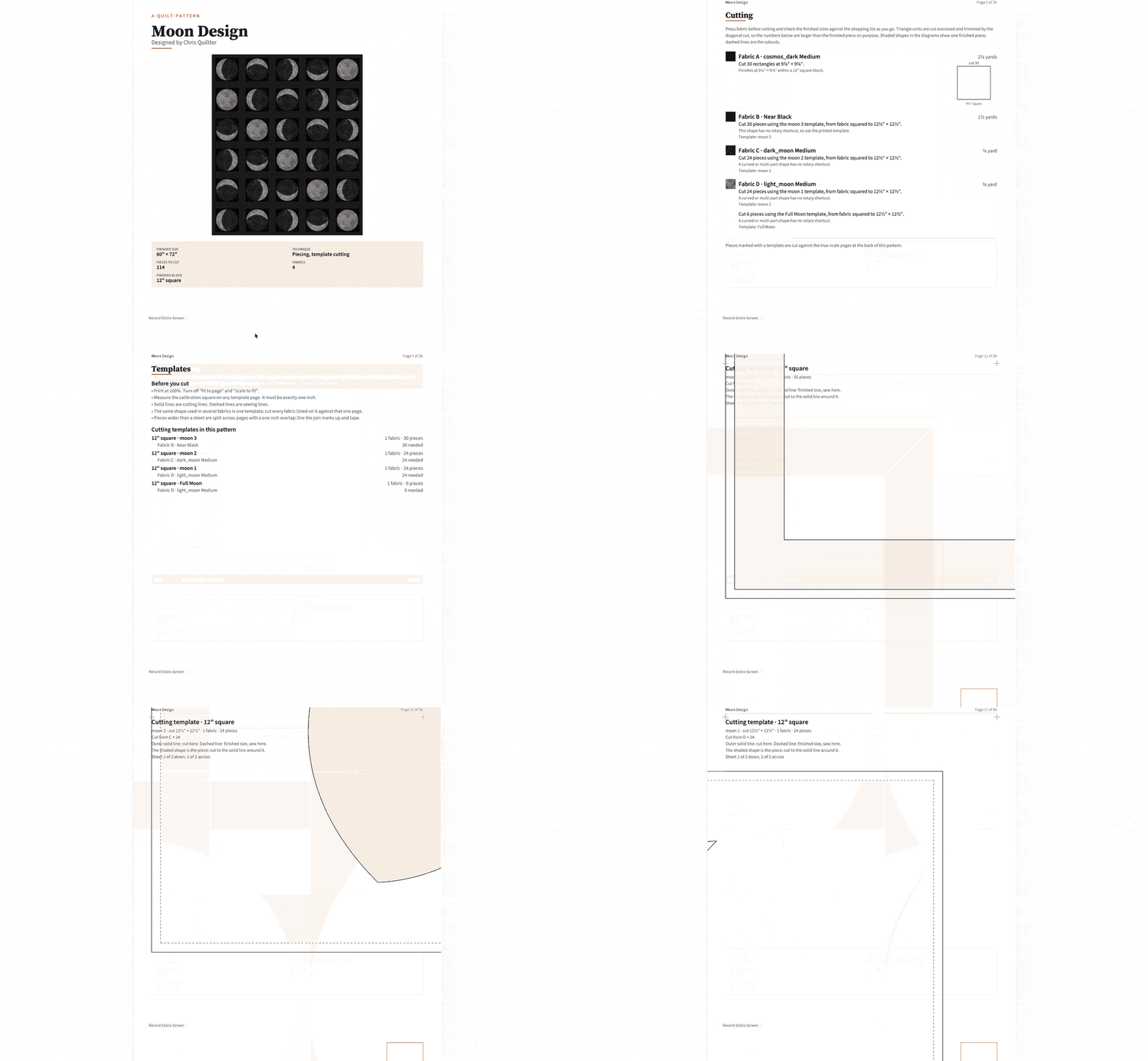
You can design and recolor without a card, keep five stash fabrics, view required yardage and save your first quilt on Quiltler’s free tier.