If you use Procreate to sketch quilts or audition colors, you may be wondering how much work dedicated quilt design software could remove. This Quiltler vs Procreate comparison looks at what happens after the visual idea: accurate dimensions, real fabrics, yardage, cutting instructions, and a pattern you can take to the cutting table. It also explains where Procreate remains the better tool.
What This Comparison Covers
- What This Comparison Covers
- Quiltler vs Procreate at a Glance
- Quiltler strengths and limitations
- Procreate strengths and limitations
- The Core Difference: Quilt Design System vs. Art Canvas
- Designing Quilt Tops and Auditioning Fabric
- Yardage, Cutting Charts, and Makeable Patterns
- Drawing Quilting Lines, Art Quilts, and Motifs
- Price, Free Access, and Long-Term Cost
- Devices, File Handling, and Project Syncing
- Which Should You Choose—or Should You Use Both?
- Choose by project type
- Continue Comparing Quilt Design Tools
Quiltler vs Procreate at a Glance
Quiltler is the better choice for designing a makeable pieced quilt because it connects the layout to fabrics, yardage, cuts, and pattern output. Procreate is better when your main task is freehand drawing, quilting-line planning, or visual art on an iPad.
| Feature | Quiltler | Procreate |
|---|---|---|
| Best for | Makeable pieced quilts | Drawing and visual concepts |
| Price model | Free tier + subscription | $12.99 one-time purchase |
| Free tier | Yes Yes | No No |
| Primary platform | Browser-based desktop studio | iPad only |
| Apple Pencil | Companion app support | Apple Pencil support |
| Drawing tools | Quilt layout and cuts | 300+ brushes and guides |
| Fabric stash | Photo-based fabric library | Manual image mock-ups |
| Automatic yardage | Yes Yes | No No |
| Cutting output | PDF summary and charts | No automatic instructions |
| Pattern output | Printable premium pattern packs | No automatic pattern |
| Project syncing | Account and Apple syncing | No automatic iCloud sync |
Quiltler’s free tier includes unlimited designing and recoloring, an unlimited fabric library, automatic yardage, and one saved quilt. Printable pattern packs and an unlimited saved-design library require a subscription. Procreate Pocket is a separate iPhone product.
Quiltler strengths and limitations
What works about Quiltler
- Calculates fabric and yardage from the quilt design
- Auditions photographs of fabric from your stash
- Creates custom shapes and blocks with Cut Designer
- Produces cutting summaries and premium pattern packs
- Runs in modern browsers on Windows, Mac, and Chromebook
- Syncs projects across a signed-in account
Where it falls short
- Premium pattern output requires a recurring subscription
- The companion app requires iOS or iPadOS 18.5 or later
- Its specialist tools are less suitable for freehand illustration and painting
Procreate strengths and limitations
What works about Procreate
- More than 300 brushes for drawing and painting
- Layers, masks, selections, and assisted drawing
- Perspective and symmetry guides for motif development
- Useful for drawing quilting lines over photographs
- One-time purchase without a subscription
- Supports animation, time-lapse recording, and 3D painting
Where it falls short
- Available only for iPad
- Does not calculate quilt yardage or cutting instructions
- Does not automatically generate quilt patterns
- Precise sizing can be clunky for quilt construction
- Artwork requires manual backup or export
The Core Difference: Quilt Design System vs. Art Canvas
Quiltler treats a project as a quilt with dimensions, blocks, cuts, and assigned fabrics. Those parts remain connected, so changing the layout or fabric choices changes the material requirements. Its built-in quilt block library and Cut Designer give you both traditional blocks and custom geometry.
Procreate treats the project as raster artwork. You can draw a convincing quilt top, use guides to build repeated forms, and organize the image with layers, but the canvas does not know that a triangle is a fabric cut or that several shapes come from the same yardage. Construction planning therefore remains manual.
That distinction matters when you move from an image to fabric. Quiltler is designed to answer what to cut and how much to buy, while Procreate is designed to give you control over what an image looks like. The broader guide to designing quilts explains how dimensions, blocks, and fabric choices fit together.
Designing Quilt Tops and Auditioning Fabric
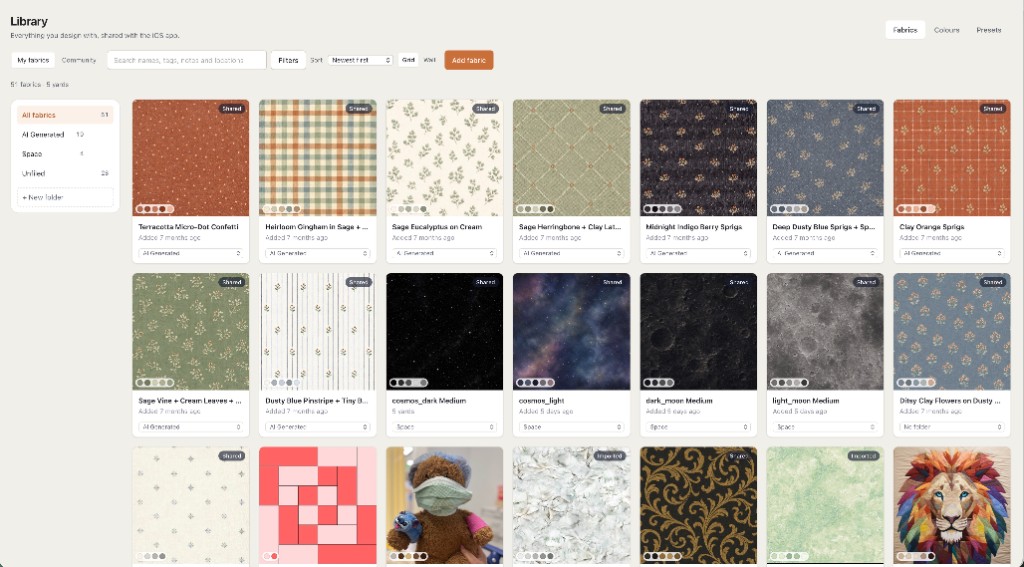
In Quiltler, you set the quilt size and block grid, place blocks, create custom cuts, and recolor the layout. You can photograph fabrics from your real stash, store them in an unlimited fabric library, and audition them directly in the design. For prints that need accurate visual proportions, the fabric print scale guide explains how scale changes a mock-up.
Procreate can import images and supports coloring, fabric replacement, sketching, layers, masks, and selections. That makes it useful for visual mock-ups, especially when you already have a quilt image or coloring sheet. Building precisely sized pieces and tracking how those pieces relate to fabric quantities requires more manual setup.
Choose Quiltler when the mock-up needs to remain connected to quilt dimensions and materials. Choose Procreate when you want to paint, sketch, or alter the appearance freely and do not need the canvas to perform quilt math.
Yardage, Cutting Charts, and Makeable Patterns
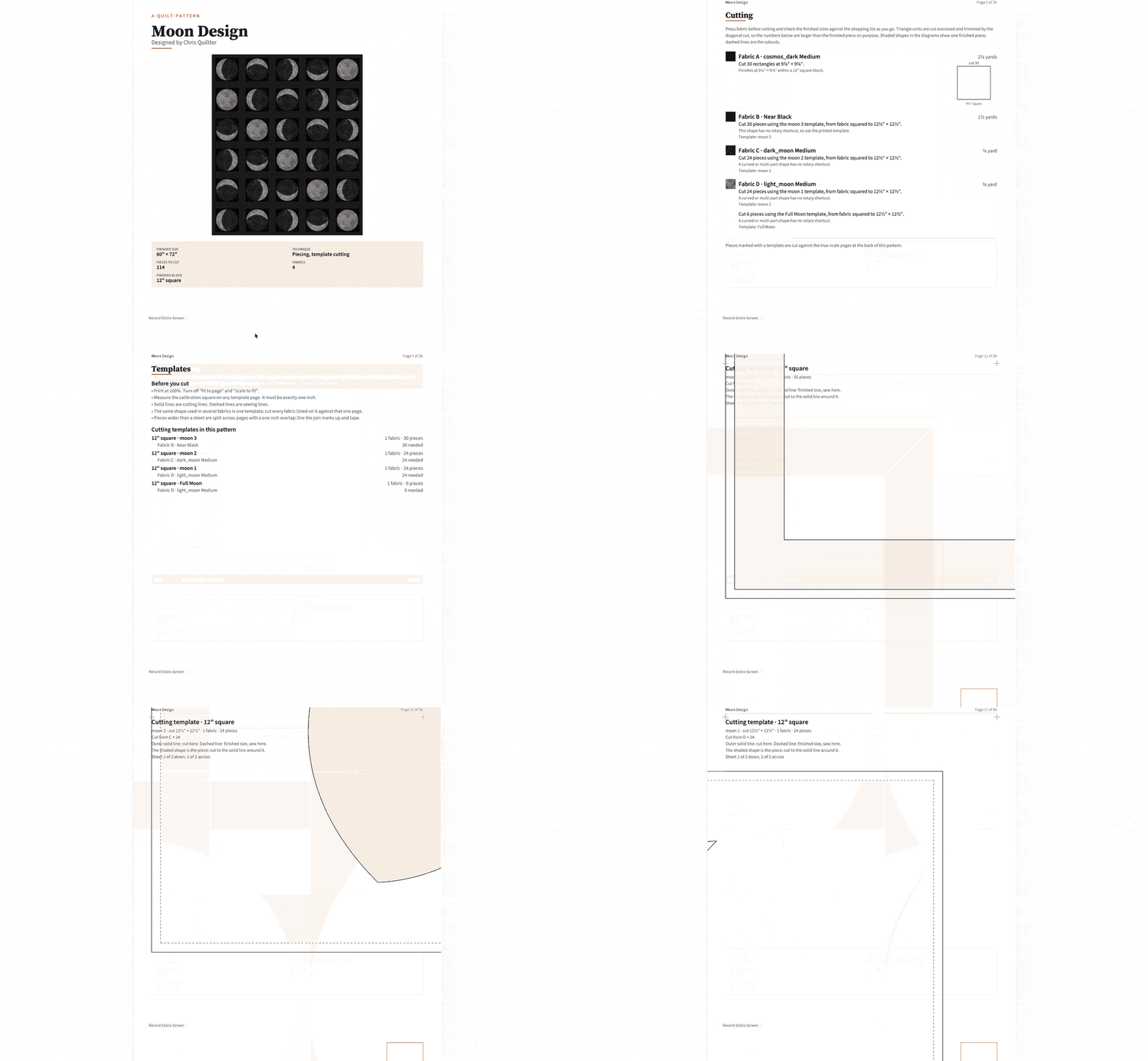
Quiltler automatically calculates fabric and yardage from the assigned cuts and fabrics. It can export a cutting summary as a PDF, while a premium pattern pack includes a shopping list, rotary cutting chart, assembly map, and true-scale templates. The cuts and fabrics guide shows why modeling individual pieces matters for accurate yardage.
Procreate does not estimate quilt yardage, derive cutting instructions, or generate a quilt pattern from artwork. You can write measurements on layers or create a visual reference, but you must calculate quantities and construction details elsewhere. That may be acceptable for an improvisational project, but it adds work to a repeatable pieced pattern.
Quiltler also has an editable pattern marketplace. A purchased pattern opens in the studio, where you can recolor, resize, and assign different fabrics before making it. If you only need a quick material calculation outside a saved project, Quiltler also provides a free quilt fabric calculator.
Drawing Quilting Lines, Art Quilts, and Motifs
Procreate has the clear advantage for freehand work. Its library of more than 300 brushes, Apple Pencil input, layers, masks, selections, perspective guides, symmetry guides, and assisted drawing provide a flexible environment for developing visual ideas. You can also record a time lapse, create animation, and work with 3D texture painting.
For quilting, those tools are useful when drawing proposed lines over a quilt photograph, developing repeating motifs or pantographs, planning a whole-cloth quilt, or sketching an improvisational art quilt. Symmetry and assisted grids can help you build radial or repeating designs without turning them into piecing instructions.
Quiltler’s companion app works with a finger or Apple Pencil on iPad, but its focus is arranging quilt components rather than simulating a broad range of drawing media. If the quilting line itself is the design, Procreate is usually the better choice. If the goal is a pieced top with calculated materials, Quiltler removes more manual work.
A combined workflow can make sense: plan the pieced quilt and its materials in Quiltler, then import available PDF or image references into Procreate to explore quilting lines.
Price, Free Access, and Long-Term Cost
Quiltler is free to start without a card. The free tier allows unlimited designing and recoloring, an unlimited fabric library, automatic yardage, one saved quilt, and access to the community and marketplace. A subscription adds unlimited saved designs, printable pattern packs and cutting templates, community imports, publishing, and pattern selling.
Procreate costs $12.99 as a one-time US App Store purchase and does not require a subscription. It has no ongoing free tier, and its official listing presents it as a paid download rather than confirming a free trial. That purchase model offers better long-term value if you mainly want drawing tools and do not need quilt calculations or pattern production.
Quiltler offers the lower-risk way to test a quilt-specific workflow because its useful free tier does not expire. The subscription earns its place when automatic production documents and a larger saved-project library regularly replace manual work. If those features would sit unused, Procreate’s one-time purchase is the more economical fit.
Devices, File Handling, and Project Syncing
Quiltler’s main design studio runs in any modern browser, including on Windows, Mac, and Chromebook. Its touch-first companion app runs on iPhone and iPad, Apple Silicon Macs, and Apple Vision Pro; the iPhone and iPad app requires iOS or iPadOS 18.5 or later. Signed-in projects sync across the account and across Apple devices with iCloud.
Procreate is available only for iPad. The researched App Store version, Procreate 5.4.12, requires iPadOS 16.3 or later, so it supports an older operating-system baseline than Quiltler’s companion app. Procreate Pocket is a separate iPhone product rather than an included iPhone version of the purchased iPad app.
Procreate can import PDFs and images and export layered PSD files. It does not automatically sync artwork through iCloud, so you need to back up or export artwork manually. Available layers also depend on canvas size and iPad hardware, which is worth considering for large, detailed artwork.
Quiltler is the stronger option when you want to move between a desktop browser and mobile devices without manually transferring each project. See the broader iPad quilting app comparison if your decision also involves other quilt-specific tools.
Which Should You Choose—or Should You Use Both?
Base the decision on the output you need rather than the device you already own. A visual concept, quilting plan, and construction-ready quilt pattern are different deliverables, even when they begin with the same idea.
For most quilters designing pieced projects, Quiltler is the best choice. Its dimensions, fabric library, automatic yardage, cutting summary, syncing, and premium pattern packs replace tasks that remain manual in Procreate. Procreate is the better recommendation when freehand drawing is the main work.
Choose by project type
- Choose Quiltler for traditional piecing, accurately sized blocks, stash-based fabric planning, yardage, cutting charts, and pattern production.
- Choose Procreate for whole-cloth quilting, free-motion plans, pantographs, art-quilt concepts, and freehand illustration.
- Choose Quiltler if you work on Windows, Mac, or Chromebook, or want browser access alongside an Apple companion app.
- Choose Procreate if you have a compatible iPad and want a one-time purchase for general drawing beyond quilting.
- Use both when you need Quiltler’s construction planning and Procreate’s drawing tools for quilting-line development.
You can start a quilt in Quiltler without a card and check the yardage before deciding whether you need premium pattern output.
Continue Comparing Quilt Design Tools
Best Quilt Design Apps
Compare leading options for iPad, iPhone, and desktop quilt planning.
Design a Quilt Online
See how browser-based quilt design connects layouts, fabrics, and yardage.
Quilt Design Software Guide
Explore Quiltler’s desktop studio, companion app, calculations, and pattern tools.