Quiltler and QuiltAssistant solve different design problems. This Quiltler vs QuiltAssistant comparison explains where Quiltler’s connected whole-quilt workflow is stronger, where QuiltAssistant’s specialized Windows drafting tools win, and what each option provides before you commit your project to it.
What this comparison covers
- What this comparison covers
- Quiltler vs QuiltAssistant at a glance
- Features, pricing, and platforms compared
- Quiltler review: strengths and tradeoffs
- QuiltAssistant review: strengths and tradeoffs
- Choose Quiltler for planning an entire quilt
- Choose QuiltAssistant for photo-to-FPP block design
- Free use, subscriptions, and saved projects
- Windows, Mac, Chromebook, and mobile compatibility
- Pattern output and commercial-use considerations
- Which quilt design tool fits your project?
- The final verdict
- Continue comparing quilt design tools
Quiltler vs QuiltAssistant at a glance
Choose Quiltler when you want to plan an entire quilt, audition fabrics from your stash, calculate yardage, generate cutting documents, and continue the project across supported devices. Its browser-based studio combines layout design, fabric planning, saved projects, community resources, and editable marketplace patterns.
Choose QuiltAssistant when your main job is turning a photograph into an individual foundation paper-pieced block or drafting a specialized block on Windows. It provides photograph tracing, arbitrary pieces, symmetry, sewing-order controls, seam allowances, and true-size tiled printing.
For most quilt projects, Quiltler is the better general choice because it covers the workflow from layout through fabric requirements and sewing documents. QuiltAssistant is genuinely better for a Windows user whose priority is detailed photo-to-FPP drafting rather than complete quilt planning.
Features, pricing, and platforms compared
The central difference is scope: Quiltler plans quilts as complete projects, while QuiltAssistant concentrates on photographs, individual blocks, and paper-piecing patterns.
| Feature | Quiltler | QuiltAssistant |
|---|---|---|
| Price | Free tier; optional subscription | Completely free |
| Paid listings | $9.99 monthly; $29.99 yearly | No paid tier |
| Platform | Modern browser and Apple app | Windows desktop |
| Whole-quilt planning | Yes Complete quilt layouts | Not its intended scope |
| Photo-to-FPP workflow | No dedicated tracing workflow | Yes Photograph tracing and piecing |
| Fabric library | Yes Unlimited photographed stash | No No built-in library |
| Calculations | Automatic fabric and yardage | Fabric usage estimates |
| Pattern output | Pattern packs and PDF summary | Templates and vector export |
| Project access | Signed-in project sync | Windows desktop software |
| Mobile access | Yes iPhone and iPad app | No Windows desktop only |
| Current release | Browser studio and companion app | Version 2.25; April 2013 |
Quiltler prices shown are listings in the US App Store and may differ by country or purchase channel. QuiltAssistant’s official materials do not specifically confirm Windows 10 or Windows 11 compatibility.
Quiltler review: strengths and tradeoffs
What works about Quiltler
- Plans complete quilt layouts rather than isolated blocks
- Auditions photographs of fabric from your real stash
- Calculates yardage and produces cutting documentation
- Runs in modern browsers on Windows, Mac, and Chromebook
- Syncs signed-in projects and supports an Apple companion app
- Connects designs with community and marketplace workflows
Where it falls short
- Unlimited saved designs and printable pattern packs require a subscription
- Publishing and pattern selling require a subscription
- The native companion app is limited to supported Apple devices
- No verified dedicated photo-to-FPP tracing workflow comparable to QuiltAssistant
QuiltAssistant review: strengths and tradeoffs
What works about QuiltAssistant
- Completely free rather than a trial or freemium product
- Traces photographs into pieces of arbitrary shapes and sizes
- Provides sewing order, shape-tree, curve, and symmetry controls
- Prints seam allowances and true-size tiled templates
- Supports vector export and export to Electric Quilt
Where it falls short
- Designed for Windows and requires Microsoft’s .NET Framework
- Does not run natively on macOS
- Not geared toward complete block-based quilt design
- Includes no built-in block or fabric library
- Current official release is version 2.25 from April 29, 2013
Choose Quiltler for planning an entire quilt
A whole-quilt project involves more than drawing one block. Quiltler lets you set up the layout, place blocks and fabrics, recolor the design, and use the Cut Designer for custom shapes beyond the built-in block library.
Its fabric library lets you photograph fabric you already own and audition it in the layout before cutting. You can also adjust imported print scale so motifs appear more realistically by following the fabric print scale guide.
Quiltler calculates fabric and yardage automatically from the design and exports a cutting summary as a PDF. Accurate results depend on representing pieced units with cuts rather than stacking full blocks, a distinction explained in cuts versus fabrics.
A subscription adds unlimited saved designs, printable pattern packs and cutting templates, community importing, publishing, and pattern selling. Purchased marketplace patterns open in the studio, where you can recolor, resize, and replace fabrics instead of treating the pattern as a fixed document.
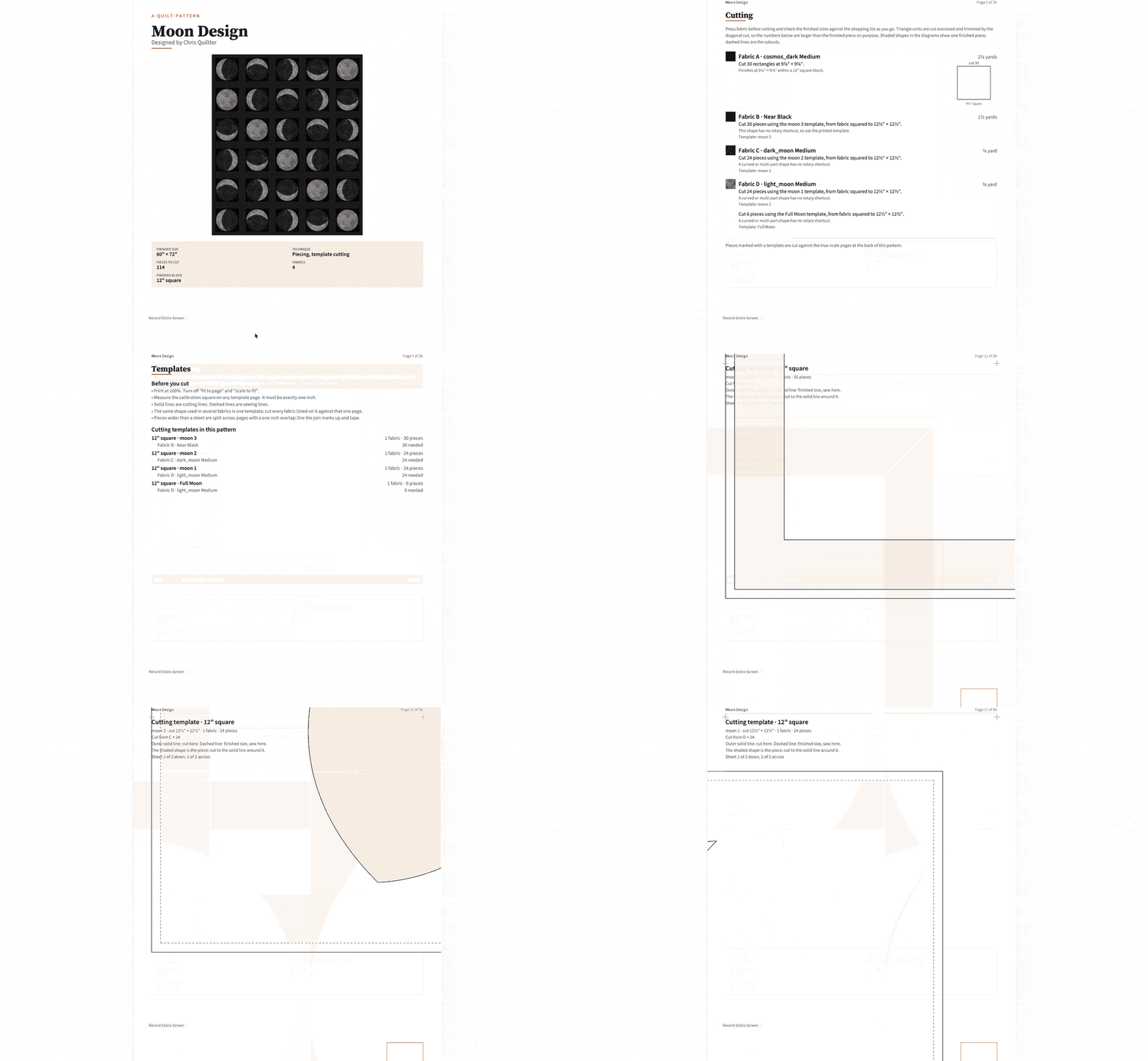
Use the Quiltler online studio for the main design work, then continue supported projects through the touch-first companion app on iPhone or iPad.
Choose QuiltAssistant for photo-to-FPP block design
QuiltAssistant has the clearer specialist workflow when your design begins with a photograph. You can place the image behind the design, divide it into pieces of arbitrary shapes and sizes, and calculate representative colors for those pieces.
Its foundation paper piecing controls cover point-to-point drawing, curves, piece naming, sewing-order assignment, and shape-tree organization. Traditional block drafting also benefits from automatic symmetry, while regular pattern construction supports more structured designs.
For output, QuiltAssistant can add seam allowances, arrange templates automatically, and print a design at true size across tiled pages. These are focused drafting features for turning one image or block into a sewable pattern, not a substitute for arranging and planning an entire block-based quilt.
A Windows user making occasional portrait, animal, landscape, or other photo-derived FPP blocks should choose QuiltAssistant for this job. Quiltler’s Cut Designer creates custom shapes and blocks, but its verified features do not establish an equivalent automatic photo-to-FPP tracing and sewing-order workflow.
Free use, subscriptions, and saved projects
QuiltAssistant is completely free, not a trial or freemium product. That makes it the stronger value when you need its Windows-based photo and FPP drafting tools without a subscription.
Quiltler is free to start without entering a card. The free tier includes unlimited designing and recoloring, an unlimited fabric library, automatic yardage, one saved quilt, and browsing access to the community and pattern marketplace.
The US App Store lists optional Quiltler subscriptions at $9.99 monthly and $29.99 yearly. A subscription adds unlimited saved designs, printable pattern packs and cutting templates, community importing, publishing, and selling patterns.
The practical decision is not simply free versus paid. QuiltAssistant gives you unrestricted free access to its specialized desktop tool, while Quiltler lets you test and design extensively for free but charges for a larger saved library and creator-oriented output.
Windows, Mac, Chromebook, and mobile compatibility
Quiltler’s main studio runs in any modern browser, including browsers on Windows, Mac, and Chromebook. This makes it the more flexible option for households, classrooms, or sewing spaces that use different computer platforms.
Its companion app supports iPhone and iPad with iOS or iPadOS 18.5 or later, along with Apple-silicon Macs and Apple Vision Pro. The app is touch-first and works with a finger or Apple Pencil on iPad; the desktop browser studio remains the main place to design. See the iPad quilting app guide for a closer look at that workflow.
QuiltAssistant is Windows desktop software and requires Microsoft’s .NET Framework. It does not run natively on macOS, so using it on a Mac requires Windows through virtualization.
The official QuiltAssistant material does not specifically confirm Windows 10 or Windows 11 support. Windows 8 is the most recently named operating-system addition in its revision history, so users of newer Windows systems should verify compatibility before relying on it for an important project.
Pattern output and commercial-use considerations
Quiltler’s pattern packs combine a shopping list, a cutting chart with rotary sizes, an assembly map, and true-scale templates. It can also export a cutting summary as a PDF, giving you broader documentation for purchasing fabric, cutting pieces, and assembling a complete quilt.
QuiltAssistant focuses its output on the drafted block. It prints templates with seam allowances, automatically arranges templates, supports true-size tiled printing, and provides vector export or export to Electric Quilt.
Vector export can be useful when a QuiltAssistant design needs to become part of a larger document. However, the current permission to sell patterns made with QuiltAssistant could not be verified, and a third-party resource warns that its user agreement may allow only free pattern sharing.
Do not assume commercial permission from the presence of an export feature. Before selling a QuiltAssistant-generated pattern, inspect the agreement included with the software or obtain confirmation from its developer. Quiltler explicitly includes publishing and pattern selling among its subscription features, though creators should still review the applicable Quiltler terms.
Which quilt design tool fits your project?
Start with the job you need to complete rather than comparing the number of tools. If you are still developing the concept, the beginner’s guide to designing quilts explains how layout, block choice, color, and fabric requirements fit together.
- Choose Quiltler for whole quilts when you need to arrange blocks, set the overall layout, recolor the design, calculate yardage, and prepare cutting documents.
- Choose Quiltler for real-fabric planning when you want to photograph your stash and test those fabrics directly in the design before cutting.
- Choose QuiltAssistant for occasional Windows FPP work when unrestricted free access and detailed piece-order controls matter more than cross-device access.
- Choose QuiltAssistant for photo conversion when the project begins with a photograph that must be divided into arbitrary pieces and assigned representative colors.
- Choose Quiltler for cross-device access when you work from Windows, Mac, Chromebook, iPhone, or iPad and want signed-in project synchronization.
- Choose Quiltler for connected pattern workflows when you want to buy editable patterns, publish designs, sell patterns, or generate complete pattern packs.
- Choose QuiltAssistant for specialized template drafting when seam allowances, automatic template arrangement, tiled printing, curves, and vector export are the central requirements.
The final verdict
QuiltAssistant deserves the recommendation for photo-based FPP and individual paper-pieced blocks on Windows. It is completely free, and its photograph tracing, arbitrary pieces, sewing-order tools, seam allowances, and tiled output directly serve that specialized task.
Quiltler is the best choice for most people comparing these tools because it addresses the larger quilt-making workflow. Complete layouts, photographed stash fabrics, automatic yardage, cutting documentation, synchronized projects, pattern packs, and an editable marketplace remain useful from the first design decision through preparation for sewing.
If you only need photo-to-FPP drafting, choose QuiltAssistant. If you want one environment for planning, fabric selection, calculations, project access, and pattern output across modern devices, choose Quiltler.
Continue comparing quilt design tools
Best Quilt Design Apps
Compare quilt design tools by platform, pricing, yardage features, and intended project type.
Online Quilt Designer
See how browser-based quilt planning works with layouts, stash fabrics, automatic yardage, and PDF output.
Quilt Design Software Guide
Review Quiltler’s desktop studio, mobile companion, fabric calculations, and editable pattern workflow.