If you need quilt design software for a Chromebook, you need a tool that runs inside Chrome rather than a Windows or Mac download. This guide compares Quiltler, PreQuilt, CINCHQuilt, Yard and PatchWorx as browser options, with EQ8 included to answer the common compatibility question.
On this page
- On this page
- The quick answer: which quilt software works on a Chromebook?
- Chromebook quilt design software compared
- What a Chromebook quilt designer should actually do
- Quiltler: browser design from photographed stash to pattern pack
- Other browser-based Chromebook options
- Quiltler strengths and limits
- PreQuilt strengths and limits
- CINCHQuilt strengths and limits
- Yard strengths and limits
- PatchWorx strengths and limits
- Why EQ8 will not work on ChromeOS
- EQ8 strengths and limits
- Free plans, trials and paid prices
- How to choose for your Chromebook workflow
- The best quilt design software for a Chromebook
- Continue comparing quilt design tools
The quick answer: which quilt software works on a Chromebook?
Quiltler, PreQuilt, CINCHQuilt, Yard and PatchWorx run in a browser, so they are options for designing on a Chromebook without installing desktop software. The differences are what they let you design, calculate, save and export.
EQ8 does not run on Chromebooks or ChromeOS. It must be downloaded and installed on a supported Windows or Mac computer. Opening the EQ8 website in Chrome does not make the installed application compatible with ChromeOS.
For the broadest Chromebook workflow, Quiltler is the best choice because it connects original design, photographed stash fabrics, automatic yardage and printable construction documents in one browser studio. You can open the online quilt designer without a card and save your first quilt on the free tier.
Chromebook quilt design software compared
The five browser tools open without a traditional desktop installation. EQ8 is included as a reference because many Chromebook owners search for it by name.
| Feature | Quiltler | PreQuilt | CINCHQuilt | Yard | PatchWorx | EQ8 |
|---|---|---|---|---|---|---|
| Platform | Modern web browsers | Web browsers | Web browsers | Web browsers | Web browsers and iPad | Windows and macOS |
| Chromebook compatible | Yes Yes | Yes Yes | Yes Browser access | Yes Yes | Yes Browser access | No No |
| Installation | None | None | None | None | None | Required |
| Free access | Permanent working tier | Free demo | Permanent Starter plan | Completely free | Free limited-cohort beta | Video demonstration |
| Price | Free; plans from $7.99 monthly | From $7.50 monthly | Free; $9.95 monthly Unlimited | Free | Free during beta | $239.95 one-time |
| Personal fabric photos | Yes Yes | Yes Yes | Yes Yes | Color placement tools | Grid piecing tools | Yes Yes |
| Original block design | Yes Cut Designer | Yes Yes | Drag-and-drop planning | Simple grid layouts | No Not currently available | Yes Advanced drafting tools |
| Automatic yardage | Yes Yes | Fabric recommendations | Total-yardage shopping list | Simple layout planning | Yes Yes | Yes Yes |
| Construction output | PDF pattern pack | Cutting recommendations | Paid cut and assembly guides | Layout planning | Print-ready pattern PDF | Charts, templates, foundation patterns |
PreQuilt prices come from its official help documentation and should receive a final checkout check before publication. PatchWorx access is a limited-cohort beta, not a permanent free plan.
What a Chromebook quilt designer should actually do
A color planner and a pattern-production system solve different problems. Before choosing Chromebook quilt design software, decide which of the following jobs must happen inside the tool.
Recoloring changes the fabrics or colors in an existing design. Layout planning arranges familiar units such as squares, rectangles and half-square triangles. Both are useful, but neither necessarily means you can draft a new block.
Original drafting lets you create blocks, cuts or quilt structures rather than only rearranging supplied elements. Pattern production turns the design into practical information such as yardage, rotary-cutting sizes, templates and assembly guidance.
If you are still defining your layout, start with the guide to designing a quilt. When calculations look unexpectedly high, cuts and fabrics explains why the way a block is constructed affects yardage.
Quiltler: browser design from photographed stash to pattern pack
Quiltler is desktop quilt design software delivered through a browser-based studio. It runs in modern browsers on Chromebook, Windows and Mac without a desktop installation, while an iPhone and iPad companion provides touch-first access on supported Apple devices.
You can photograph fabric from your real stash, store it in the fabric library and audition it directly in a quilt. The free tier lets you design and recolor as much as you like, keep five stash fabrics, see required yardage, save your first quilt and browse the community and marketplace. No payment card is needed to start.
Built-in blocks cover familiar structures, while the Cut Designer creates custom shapes and blocks. Quiltler then calculates fabric and yardage automatically instead of making you transfer dimensions to a separate spreadsheet or calculator.
A subscription adds unlimited saved designs, an unlimited fabric stash and printable pattern packs. Each pattern pack contains a shopping list, a cutting chart with rotary sizes, an assembly map and true-scale templates. Quiltler can also export a cutting summary as a PDF.
Purchased marketplace patterns open as editable studio designs, so you can recolor, resize and re-fabric them. If you want to understand the available starting pieces, browse the Quiltler block library before opening the studio.
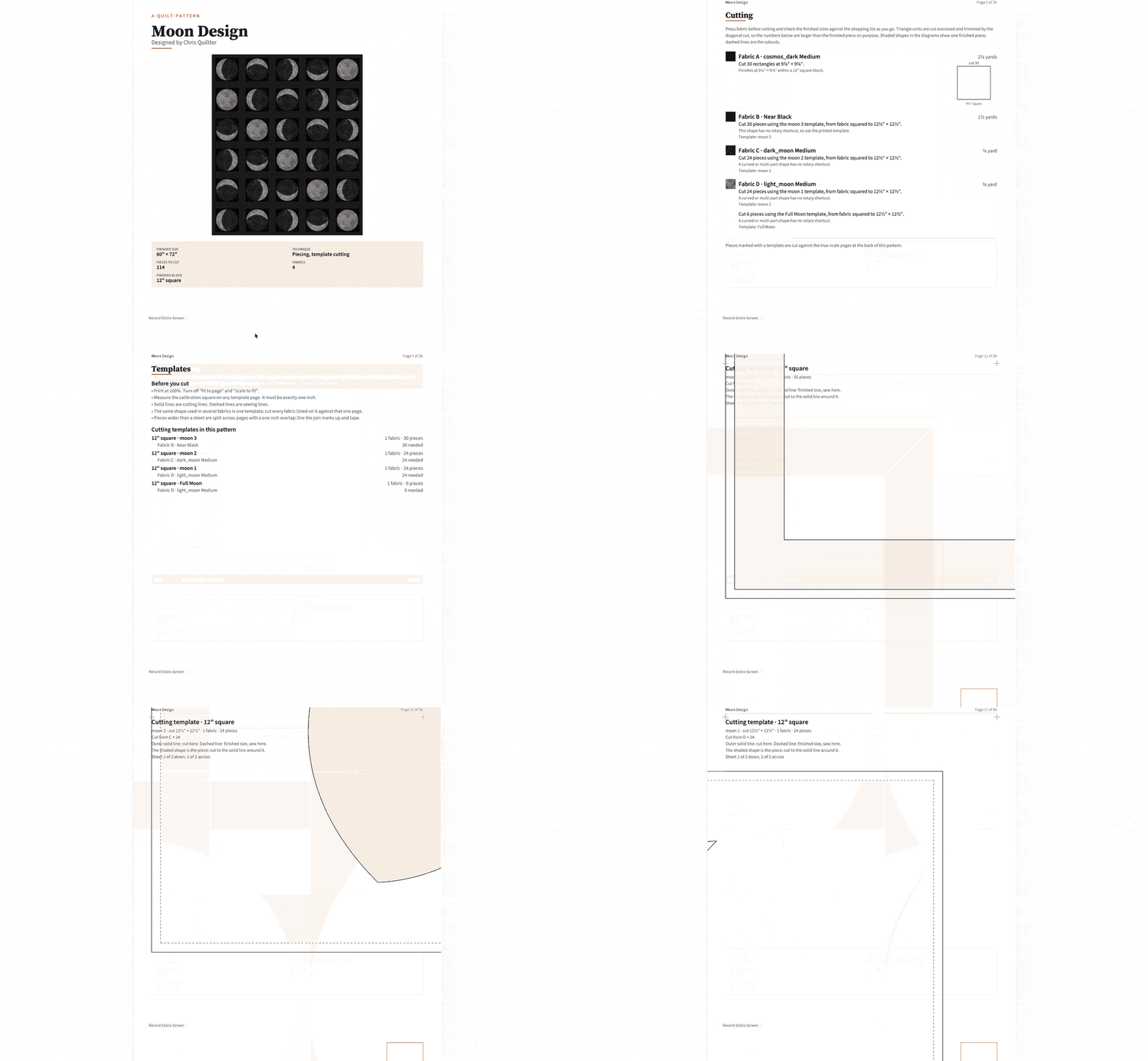
Use Quiltler free on your Chromebook to design and recolor without a card, keep five stash fabrics, see automatic yardage and save your first quilt.
Other browser-based Chromebook options
PreQuilt is the strongest alternative when you need SVG imports, triangle and on-point grids, randomization or manufacturer solid-color cards. Its Market plan also supports public interactive coloring pages that can send customers to an external pattern shop. Free access is a demo rather than a documented permanent working tier.
CINCHQuilt is well suited to approachable drag-and-drop planning. Its permanent Free Starter plan includes layout visualization, personal fabric-photo uploads and a total-yardage shopping list. Paid access adds detailed cut lists, block assembly guides and unlimited project storage, with a seven-day trial of Unlimited.
Yard is the clearest choice for uncomplicated, permanently free grid experimentation. It supports squares, half-square triangles, rectangles and color placement, but it describes itself as a simple layout planner rather than full pattern-drafting software.
PatchWorx offers automatic yardage, cut sizes, seam allowances and print-ready PDFs during its free beta. It supports grid piecing, flying geese, sashing and borders. It is recruiting testers in limited cohorts, warns of rough edges and does not currently provide custom-block design.
Quiltler strengths and limits
What works about Quiltler
- Runs in a modern Chromebook browser without installation
- Permanent free tier with design, recoloring and automatic yardage
- Uses photographs of fabric from your real stash
- Creates custom shapes and blocks with Cut Designer
- Exports complete pattern packs with construction documents
Where it falls short
- Free accounts keep five stash fabrics and one saved quilt
- Printable pattern packs require a subscription
- Mobile companion is limited to supported Apple devices
PreQuilt strengths and limits
What works about PreQuilt
- Original block design and SVG imports
- Photographed fabric swatches with scale controls
- Triangle and on-point grids
- Public interactive coloring pages on Market
Where it falls short
- Free access is a demo
- Basic storage is limited to 50 quilts
- Pricing should be checked before publication
CINCHQuilt strengths and limits
What works about CINCHQuilt
- Permanent Free Starter plan
- Personal fabric-photo uploads on the free plan
- Total-yardage shopping list on the free plan
- Resizing recalculates measurements
Where it falls short
- Detailed cut lists require paid access
- Assembly guides require paid access
- Unlimited project storage requires paid access
Yard strengths and limits
What works about Yard
- Completely free
- Nothing to install
- Fast grid and color experimentation
- Supports squares, HSTs and rectangles
Where it falls short
- Positioned as a simple layout planner
- Automatic yardage was not confirmed
- Personal stash management was not confirmed
- Complete pattern-pack output was not confirmed
PatchWorx strengths and limits
What works about PatchWorx
- Automatic yardage and cut calculations
- Print-ready PDF exports during beta
- No payment card required for beta access
- Supports sashing, borders and flying geese
Where it falls short
- Access is limited to beta cohorts
- Beta users are told to expect rough edges
- Custom-block design is not currently available
Why EQ8 will not work on ChromeOS
EQ8 does not run on Chromebooks or ChromeOS. It is an installed application for supported Windows and macOS computers. A browser cannot convert that Windows or Mac application into Chromebook software.
EQ8 remains the better fit for some designers who own a supported computer. It includes more than 6,700 blocks and 6,200 fabrics, advanced drafting, foundation patterns, appliqué tools, automatic yardage and high-resolution publishing exports. It can work offline for up to 60 days between license validations.
Choose EQ8 if that professional desktop depth matters more than Chromebook access. For a closer feature comparison, read Quiltler as an EQ8 alternative or the direct EQ8 versus Quiltler comparison.
EQ8 strengths and limits
What works about Electric Quilt 8
- More than 6,700 included blocks
- Advanced drafting, foundation and appliqué tools
- Automatic yardage and rotary-cutting charts
- High-resolution image exports
- Offline work between license validations
Where it falls short
- Does not run on Chromebook or ChromeOS
- Requires installation on Windows or Mac
- No usable free tier or trial is listed
- Costs $239.95 as a one-time purchase
Free plans, trials and paid prices
Quiltler is free to start with no card. The Quilter plan is $7.99 per month or $49.99 per year. The Designer plan is $11.99 per month or $99 per year and adds pattern-selling tools with reduced marketplace fees.
PreQuilt offers a free demo. Its official help documentation lists Basic at $7.50 per month or $50 per year and Market at $10 per month or $100 per year. Because the readable live plan page did not expose those figures during research, they should be checked at checkout immediately before publication.
CINCHQuilt has a permanent Free Starter plan. Unlimited costs $9.95 per month or $79 per year and has a seven-day free trial. Yard is completely free.
PatchWorx is free during its current beta, including PDF exports, but enrollment is limited to testing cohorts. EQ8 costs $239.95 as a one-time Windows or Mac download; its current product page lists a video demonstration rather than a usable free tier or downloadable trial.
How to choose for your Chromebook workflow
- Choose Quiltler when you want original design, photographed stash fabrics, automatic yardage and a complete pattern pack in one generally available browser studio.
- Choose PreQuilt when SVG import, on-point grids, randomization or public interactive coloring pages are central to your work.
- Choose CINCHQuilt when you want a permanent free plan with stash-photo uploads and a total-yardage shopping list, or a trial of its paid cutting workflow.
- Choose Yard when you only need free digital graph paper for quick grid and color planning.
- Choose PatchWorx when you accept limited beta access and want to test automatic calculations and PDF exports without payment.
- Choose EQ8 when you have a supported Windows or Mac computer and need its large libraries, advanced drafting, foundation patterns, appliqué tools or publishing exports.
The best quilt design software for a Chromebook
Quiltler is the best overall choice for a Chromebook because it covers the complete path from idea to sewing documents without requiring a Windows or Mac installation. You can draft original work, photograph your stash, audition those fabrics and see yardage inside the same browser studio.
Its free tier is useful for real work rather than only a demonstration: you can design freely, use five stash fabrics, see yardage and save a first quilt. When you need production output, the pattern pack adds the shopping list, rotary-cutting chart, assembly map and true-scale templates.
The alternatives still have clear places. Yard is better for permanently free, simple layout play; PreQuilt is better for public coloring pages and specialized grids; CINCHQuilt offers a seven-day paid-plan trial; PatchWorx gives accepted beta testers free PDF access; and EQ8 offers deeper installed desktop libraries and drafting on supported computers.