If you want quilt design software for Windows, the first decision is how you want the software to run. Quiltler opens in a modern browser with no installer, while Electric Quilt 8 is desktop software downloaded and installed on Windows 10 or Windows 11. This comparison covers designing quilt tops, blocks, layouts, and patterns, not software that controls a quilting machine.
What This Windows Software Comparison Covers
- What This Windows Software Comparison Covers
- Does Quiltler Work on Windows?
- Quiltler vs. Electric Quilt 8 at a Glance
- Browser-Based vs. Installed Windows Software
- Quiltler Strengths and Tradeoffs on Windows
- Electric Quilt 8 Strengths and Tradeoffs on Windows
- Designing Blocks, Layouts, and Real-Fabric Quilts
- Yardage, Cutting Charts, Templates, and Pattern Output
- Price, Free Access, and Long-Term Cost
- Working Offline and Moving Between Devices
- Which Windows Quilt Designer Fits You?
- Quick Recommendations
- Keep Comparing and Planning
Does Quiltler Work on Windows?
Yes. Quiltler runs in Chrome and other modern browsers on a Windows desktop or laptop. You open the online quilt designer, sign in, and work without downloading or installing a Windows program.
The desktop studio is the main Quiltler design environment. You can arrange blocks, create layouts, recolor a design, photograph fabrics from your stash, calculate yardage, and prepare pattern output from a Windows PC. It also works in modern browsers on Mac and Chromebook.
Electric Quilt 8 takes the conventional Windows software approach. You download and install it, and its official system requirements list Windows 10 and Windows 11. That makes EQ8 the closer fit if “desktop software” means a locally installed application to you.
Quiltler vs. Electric Quilt 8 at a Glance
Both products support original quilt design on Windows, but they differ substantially in setup, payment, offline use, and how projects move between devices.
| Feature | Feature | Quiltler | Electric Quilt 8 |
|---|---|---|---|
| Windows support | Comparison | Yes Any modern browser | Yes Windows 10 and 11 |
| Price | Payment model | Free, then subscription | $239.95 one time |
| Free tier | Free access | Yes Free to start | No No free tier |
| Installation | Windows setup | No No installer | Yes Downloaded and installed |
| Offline use | General designing | Browser-based studio | Yes After installation |
| Device support | Supported devices | Windows, Mac, Chromebook; Apple companion | Windows or Mac |
| Fabric importing | Personal fabrics | Yes Photograph real stash | Yes Import and scale images |
| Yardage | Automatic calculation | Yes Automatic yardage | Yes Automatic estimate |
| Cutting information | Rotary cutting details | Yes Pattern-pack cutting chart | Yes Rotary-cutting charts |
| Templates | Printable templates | Yes True-scale templates | Yes Templates and foundation patterns |
| Final output | Project export | Paid pattern pack PDF | Printouts and image exports |
EQ8 describes its yardage as an estimate. Non-rotary-cuttable shapes can create generous overestimates, and EQ8 does not calculate binding yardage directly. Quiltler’s printable pattern packs require a paid subscription.
Browser-Based vs. Installed Windows Software
Quiltler treats your browser as the Windows design workspace. There is no installer to manage, so you can start by opening the studio and creating an account without entering a card. This approach also avoids tying your design workflow to a Windows-only application.
EQ8 is installed desktop software with a single-user licence and two activations. It is the better choice when you specifically want local software that can be used without an internet connection after installation. Its official requirements name Windows 10 and Windows 11.
A Quiltler account is more flexible when you regularly change computers or use more than one kind of device. Signed-in projects sync through your account, while the iPhone and iPad companion provides touch-first access away from the PC. The companion requires iOS or iPadOS 18.5 or later and supports a finger or Apple Pencil on iPad.
For a broader comparison of desktop and mobile options, see the quilt design app guide or the EQ8 alternative overview. These explain how browser access changes the meaning of desktop quilt software.
Quiltler Strengths and Tradeoffs on Windows
What works about Quiltler
- Opens in a modern Windows browser without an installer
- Free to start without entering a card
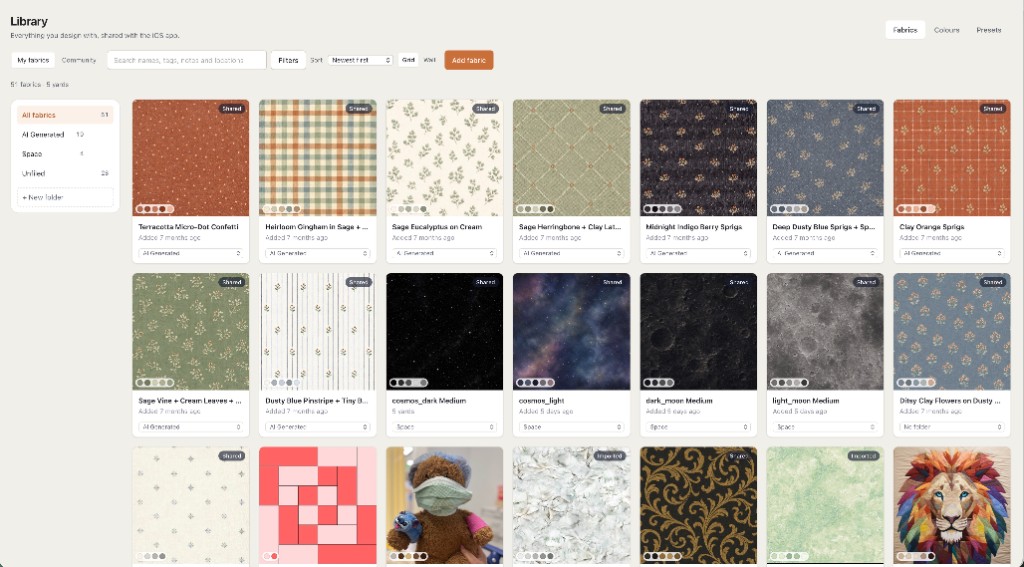
- Photographs and auditions fabrics from your real stash
- Calculates fabric and yardage automatically
- Creates custom shapes and blocks with Cut Designer
- Syncs signed-in projects across supported devices
- Exports a combined pattern pack for paid subscribers
Where it falls short
- The main Windows studio is browser-based rather than installed software
- The native companion app is limited to supported Apple devices
- Free accounts are limited to five stash fabrics and one saved quilt
- Unlimited saves, unlimited stash storage, and pattern packs require a subscription
Electric Quilt 8 Strengths and Tradeoffs on Windows
What works about Electric Quilt 8
- Runs offline for general work after installation
- Uses a one-time purchase model
- Includes more than 6,700 blocks
- Includes more than 6,200 fabrics
- Supports custom block and quilt-layout drafting
- Provides foundation patterns and detailed template controls
- Supports high-resolution exports for print publication
Where it falls short
- No free tier or confirmed downloadable software trial
- Requires downloading, installation, and licence activation
- Windows and Mac use requires a separate $24.95 Migration Kit
- Yardage is described as an estimate
- Binding yardage is not calculated directly
Designing Blocks, Layouts, and Real-Fabric Quilts
Both programs go beyond coloring a finished pattern. Quiltler lets you arrange blocks and fabrics on a quilt canvas, while Cut Designer creates custom shapes and blocks beyond the built-in library. If you are new to planning layouts, the guide to designing a quilt covers block choice, dimensions, fabric, and color decisions.
Quiltler’s distinguishing fabric workflow begins at your shelves. You photograph fabric you already own, save it in your fabric library, and audition it in a layout. This helps you judge how your actual prints and colors work together before cutting.
Print scale matters when a motif needs to appear at its real size. The fabric print scale guide explains how cropping, tiling, and scaling affect what you see in the design.
EQ8 lets you import and scale fabric images, and it includes more than 6,200 fabrics. It also advertises more than 6,700 blocks, plus custom block and quilt-layout drafting, photo tracing, and appliqué tools. EQ8 is the stronger fit if a very large included library or those specialized drafting tools are central to your work.
Yardage, Cutting Charts, Templates, and Pattern Output
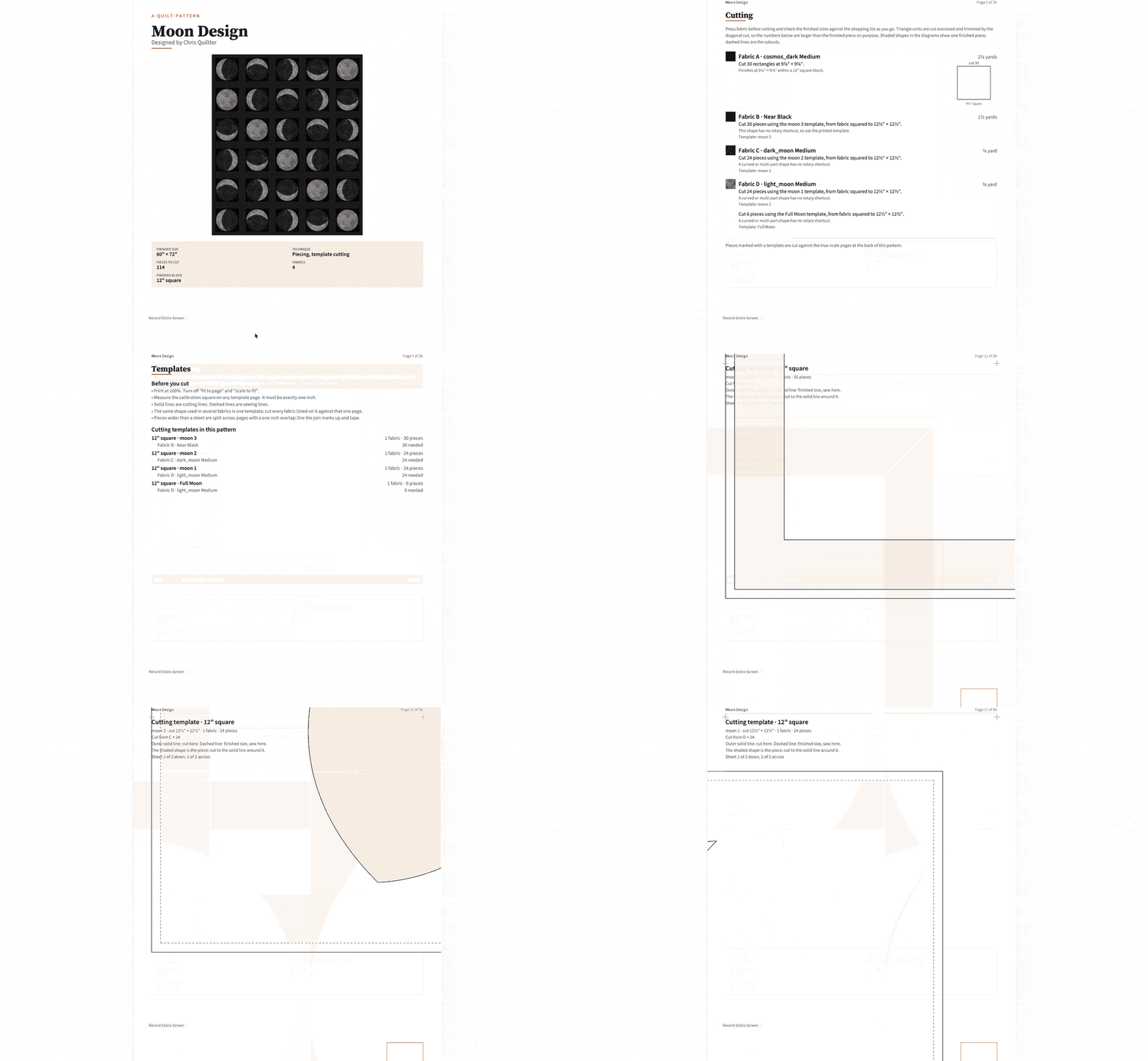
A screen mockup answers what a quilt may look like. Cutting-table output answers how much fabric to obtain, which pieces to cut, and where they belong. Both Quiltler and EQ8 provide more than a visual image, but their output is organized differently.
Quiltler calculates fabric and yardage automatically. A paid pattern pack combines a shopping list, a cutting chart with rotary sizes, an assembly map, and true-scale templates. It can also export a cutting summary as a PDF, keeping several construction details together rather than requiring you to assemble separate documents.
Accurate Quiltler calculations depend on describing the pieces in the design correctly. The explanation of cuts, fabrics, and yardage shows why stacking complete blocks can over-report fabric and why individual cuts produce more useful requirements.
EQ8 generates automatic yardage estimates, rotary-cutting charts, printable templates, foundation patterns, and fat-quarter estimates. It also supports colored foundation-pattern printing, detailed cutting controls, and high-resolution image exports intended for magazines and print publication. Those capabilities make EQ8 a sensible choice for foundation-piecing work or publication workflows.
EQ8 does not calculate binding yardage directly. If you choose it, Quiltler’s free binding calculator can calculate strip count and fabric yardage separately.
Price, Free Access, and Long-Term Cost
Quiltler is free to start, and no card is required. A free account lets you design and recolor without a set design limit, keep five fabrics in your stash, view required yardage, save your first quilt, and browse the community and marketplace.
Current Quiltler terms list the Quilter plan at $7.99 per month or $49.99 per year, and the Designer plan at $11.99 per month or $99 per year. A subscription adds unlimited saved designs, an unlimited fabric stash, printable pattern packs and cutting templates, community importing, publishing, and pattern selling.
EQ8 costs $239.95 for either the Windows or Mac download as a one-time purchase. It has no free tier, although Electric Quilt provides a demonstration video. The available research did not confirm an official downloadable trial.
An EQ8 purchase provides a single-user licence with two activations. Using both Windows and Mac editions requires a separate Migration Kit costing $24.95. EQ8 fits better if you prefer paying once for installed software, while Quiltler lets you begin designing before deciding if its paid output and storage features are worth a subscription.
You can open Quiltler’s Windows browser studio and test the design and recoloring workflow without a card.
Working Offline and Moving Between Devices
EQ8 has the clear advantage when dependable offline operation is required. After installation, it can be used without an internet connection for general work. That may matter in a sewing room with unreliable service or when you do not want a browser-based workflow.
Quiltler emphasizes access and synchronization instead. The main studio opens in a modern browser on Windows, Mac, or Chromebook, and projects sync across a signed-in account. Apple devices can also synchronize through iCloud.
The iPhone and iPad companion is useful when you want your project near the fabric shelf or cutting table. On iPad, you can work with a finger or Apple Pencil, then continue in the desktop browser. The iPad quilting app guide explains that touch-first workflow in more detail.
Choose EQ8 if offline Windows work outweighs device continuity. Choose Quiltler if moving between a Windows computer and supported Apple devices is more important than running a locally installed program.
Which Windows Quilt Designer Fits You?
Choose Quiltler if you want to begin without a download or upfront purchase, design with photographed stash fabrics, and keep projects available across supported devices. It is also the better fit when you want one generated pack containing a shopping list, rotary-size cutting chart, assembly map, and true-scale templates.
Choose EQ8 if offline operation is required, you prefer a one-time purchase, or you need its large included block and fabric libraries. Its foundation-pattern printing, appliqué tools, photo tracing, detailed template controls, and publication-oriented image exports also give it an advantage in specialized production work.
For most Windows quilters seeking a straightforward route from an idea to usable cutting information, Quiltler is the best choice. That conclusion rests on its no-installer Windows access, free starting tier, real-stash photography, automatic calculations, synchronized projects, and combined pattern-pack output. EQ8 remains the better recommendation when offline use or its established advanced toolset is the deciding requirement.
Quick Recommendations
- Use Quiltler for a no-download online quilt designer on Windows
- Use Quiltler to photograph and audition fabric from your shelves
- Use Quiltler to continue a project on iPhone or iPad
- Use EQ8 when you need general offline operation after installation
- Use EQ8 for its library of more than 6,700 blocks
- Use EQ8 for colored foundation patterns or publication image exports