If you want quilt pattern software, you probably need more than a digital coloring page. This comparison focuses on the usable output: fabric requirements, cutting dimensions, an assembly reference and printable templates connected to a scaled design. It also explains when specialist drafting software or a designer-written PDF is the better choice.
On this page
- On this page
- What quilt pattern software should give you
- Quiltler, EQ8, static PDFs and NiftyFifty at a glance
- From an editable Quiltler design to a printable pattern pack
- Quiltler strengths and tradeoffs
- Quilt pattern software versus a static PDF pattern
- Static PDF strengths and tradeoffs
- How Quiltler’s pattern pack differs from EQ8 printouts
- Electric Quilt 8 strengths and tradeoffs
- Where NiftyFifty Pattern Designer fits
- NiftyFifty strengths and tradeoffs
- Choose based on what you need to print and sew
- Keep planning your quilt
What quilt pattern software should give you
A useful quilt design begins at a defined finished size. Blocks, borders and individual pieces need dimensions that relate to the quilt you intend to sew, not just proportions that look good on a screen. If you are still planning the layout, the quilt design guide covers block selection, fabric choices and digital tools.
The next requirement is fabric information tied to that design. You should be able to see how much fabric the quilt needs and which pieces to cut from each fabric. This connection matters because resizing a quilt, replacing a block or changing how cuts are used can alter the calculation; cuts and fabrics explains why the underlying construction affects yardage.
Finally, consider what you can print. A sewable output may include a shopping list, rotary-cutting dimensions, an assembly map and true-scale templates. Sequential pressing, trimming and technique instructions are a separate kind of value, usually supplied by a designer-authored pattern rather than generated from a layout alone.
Quiltler, EQ8, static PDFs and NiftyFifty at a glance
The main difference is not simply how each option draws a quilt. It is how the design becomes information you can take to the fabric store, cutting table and sewing machine.
| Feature | Feature | Quiltler | Electric Quilt 8 | Static PDF | NiftyFifty |
|---|---|---|---|---|---|
| Price model | Free start + subscription | $239.95 one-time licence | $14 Wallflower example | Free | |
| Platform | Browser, iPhone, iPad | Windows or macOS | PDF document | Browser | |
| Chromebook access | Yes Yes | No No | PDF format | Yes Yes | |
| Editable design | Yes Yes | Yes Yes | No No | Block designs | |
| Photographed fabrics | Real stash library | Photo or scan import | Fixed pattern fabrics | Block fabric choices | |
| Yardage calculation | Automatic from design | Calculated from design | Fixed pattern information | Per-fabric cutting charts | |
| Output structure | One pattern pack | Separate technical printouts | One authored PDF | Block-pattern PDF | |
| Cutting output | Whole-project cutting chart | Rotary-cutting charts | Pattern-specific instructions | Per-fabric cutting charts | |
| Assembly reference | Assembly map | Block and quilt images | Detailed sequential instructions | Step-by-step block PDF | |
| True-scale templates | Yes Yes | Yes Yes | Pattern dependent | Yes Yes | |
| Foundation output | Pattern pack templates | Colored foundation patterns | Pattern dependent | Dedicated FPP tool | |
| Offline workflow | Browser and companion app | Between licence validations | Saved PDF | Browser tool |
Wallflower is one current static PDF example, not a category-wide price. Quiltler’s pattern pack includes an assembly map but should not be confused with complete designer-written piecing instructions.
From an editable Quiltler design to a printable pattern pack
Quiltler keeps the layout and its production information in the same workflow. You design in the browser studio on Windows, Mac or Chromebook, then resize, recolor and adjust the quilt while the software calculates fabric and yardage automatically. The free tier lets you design and recolor, view yardage, keep five stash fabrics and save your first quilt without entering a card.
You can photograph fabric you already own, add it to the fabric library and audition it in the layout. This is more concrete than choosing generic colors because you can test an actual print before cutting it. For prints with a recognizable motif, fabric print scale explains how to display that motif at its real-world size.
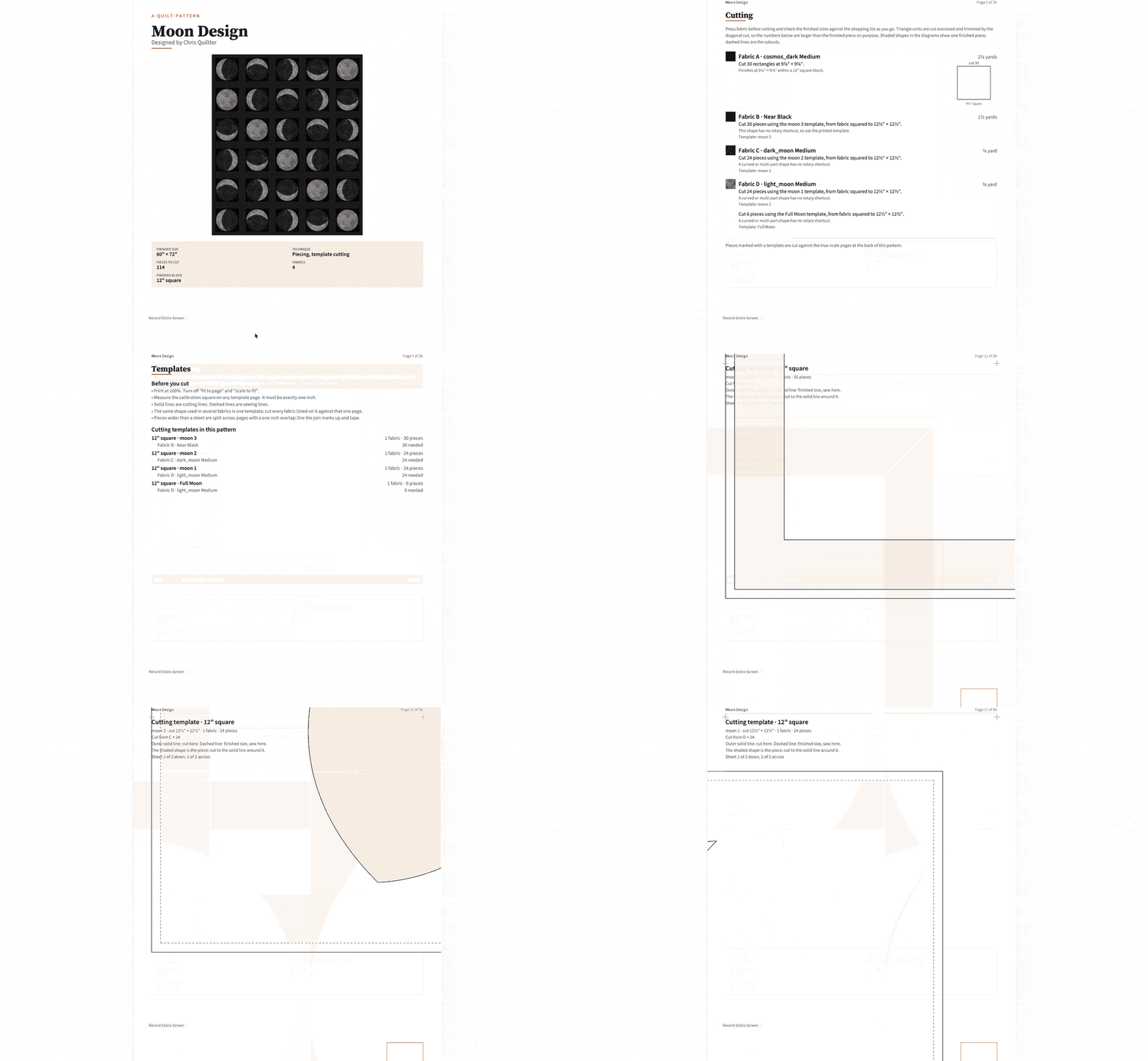
The paid subscription adds printable pattern packs and cutting templates, along with an unlimited saved-design library and unlimited fabric stash. One export combines a shopping list, a cutting chart with rotary sizes, an assembly map and true-scale templates. Because those documents come from the editable design, you can make the design decisions before producing the pack rather than rewriting a fixed pattern by hand.
The browser studio is the main design workspace. An iPhone and iPad companion provides touch-first access, including finger or Apple Pencil input on iPad, and signed-in projects sync across devices. If you specifically need a portable workflow, see the iPad quilting app guide.
Quiltler strengths and tradeoffs
What works about Quiltler
- Free to start without a card
- Runs in modern browsers, including Chromebook
- Photographed stash fabrics can be used in designs
- Automatic yardage stays connected to the design
- One pack combines shopping, cutting, assembly and templates
- Marketplace patterns open as editable studio designs
Where it falls short
- Printable pattern packs require a subscription
- The companion app requires iOS or iPadOS 18.5 or later
- An assembly map does not replace detailed authored technique instructions
- EQ8 has a much larger stated block library
Quilt pattern software versus a static PDF pattern
Editable software is more useful when you want to make the quilt your own. You can change dimensions, recolor the layout or substitute photographed stash fabrics before generating updated project documents. Quiltler marketplace purchases also open in the studio, so a bought design can be recolored, resized and re-fabriced instead of remaining fixed.
A static PDF wins when you want one defined project with human-authored sewing guidance. Pen + Paper Patterns’ Wallflower is a $14, 24-page example with two sizes, labels, coloring pages and detailed instructions. A designer can explain construction order, pressing, trimming and pattern-specific techniques in more detail than an automatically generated assembly map.
The tradeoff is that the PDF’s underlying design does not regenerate after your changes. If you choose a size already included and follow the stated fabric and cutting directions, that may not matter. For a first project, pairing a clear authored pattern with the broader beginner quilt-making guide may be simpler than designing from scratch.
Static PDF strengths and tradeoffs
What works about Static PDF quilt patterns
- Detailed sequential instructions for one design
- Can include diagrams, labels and technique notes
- Defined sizes and skill expectations
- Direct route when you want the pictured quilt
Where it falls short
- The underlying quilt design is fixed
- Design changes do not regenerate calculations
- Resizing outside supplied options requires new work
- Stash substitutions are not auditioned in an editable model
How Quiltler’s pattern pack differs from EQ8 printouts
Electric Quilt 8 is stronger for deep specialist drafting. It includes more than 6,700 quilt blocks and 6,200 manufacturer fabrics, plus Serendipity and WreathMaker tools. It also prints colored foundation patterns and exports artwork at up to 600 DPI, making it a better fit when those capabilities are central to your work.
EQ8 calculates yardage and can print quilt images, block images, rotary-cutting charts, templates and foundation patterns. These are separate technical print options rather than one consolidated instructional publication. Electric Quilt also notes that cutting counts for a repeated block may need to be multiplied by the number of times that block appears.
EQ8 does not write complete piecing instructions. A pattern writer needs another program to add construction text and create the final page layout. Quiltler’s distinction is narrower but useful: its shopping list, whole-project cutting chart, assembly map and true-scale templates are grouped into one pattern pack.
EQ8 costs $239.95 for a one-time, single-user licence covering either the Windows or Mac download. Using it on both requires a $24.95 Migration Kit, and the licence allows two simultaneously active computers. It works offline between periodic licence validations, so it is the better choice if offline desktop work matters; the full EQ8 and Quiltler comparison covers the platform decision in more detail.
Electric Quilt 8 strengths and tradeoffs
What works about Electric Quilt 8
- More than 6,700 included quilt blocks
- More than 6,200 manufacturer fabrics
- Specialist drafting tools
- Colored foundation-pattern printing
- Artwork export up to 600 DPI
- Offline use between periodic validations
Where it falls short
- Runs only on supported Windows and macOS computers
- Chromebook, iPhone and iPad are unsupported
- Windows and Mac access requires an added Migration Kit
- Print options are separate rather than one pattern pack
- Complete piecing instructions require additional writing and layout
Where NiftyFifty Pattern Designer fits
NiftyFifty is a practical free option for traditional block drafting. It runs in a browser on computers, tablets and Chromebooks, and you can begin without an account. Its block designer produces per-fabric cutting charts, true-size templates and a step-by-step block-pattern PDF.
A dedicated tool creates numbered, sectioned foundation-paper-piecing patterns. That makes NiftyFifty the better choice when your immediate goal is free FPP output, since that output is not established for Quiltler. Its standard block designer supports sizes from 4 to 18 inches and works within supported grid combinations.
The scope is more constrained than EQ8’s specialist environment. NiftyFifty states that its commercial block library is smaller than EQ8’s, and it does not offer a native mobile app. Chromebook users comparing browser options can also read the Chromebook quilt software guide.
NiftyFifty strengths and tradeoffs
What works about NiftyFifty Pattern Designer
- Free to use
- No account required to begin
- Works in browsers and on Chromebooks
- Generates per-fabric cutting charts
- Produces true-size templates
- Includes dedicated foundation-paper-piecing output
Where it falls short
- No native mobile app
- Standard block sizes are limited to 4–18 inches
- Designs use supported grid combinations
- Commercial block library is smaller than EQ8’s
Choose based on what you need to print and sew
Choose Quiltler when you want continuity from an editable quilt to one organized pattern pack. It is the best overall choice here for designing in a browser, using photographed stash fabric, checking automatic yardage and exporting shopping, cutting, assembly and template information together.
Choose Electric Quilt 8 when specialist block drafting, a large established library, foundation printing, high-resolution artwork or offline desktop use matters more than consolidated output. Choose a static PDF when you want one exact quilt with detailed, designer-written sewing instructions and do not need the pattern to recalculate.
Choose NiftyFifty when you need a free browser tool for traditional block output or foundation paper piecing. If you are choosing blocks before selecting software, the free block pattern library can help you compare construction methods and shapes.
You can start a Quiltler design free, view its yardage and save your first quilt before deciding if printable pattern packs fit your workflow.
Keep planning your quilt
Design a quilt online
See how browser-based quilt design, fabric auditioning and automatic calculations work.
Calculate quilt fabric
Check fabric requirements and cutting information for your project.
Compare quilt design apps
Compare platforms, yardage tools and design workflows across leading options.