A quilt pattern maker here is the step after the picture. You design in the studio, with the same quilt on iPhone and iPad. A Chromebook or a locked work computer uses the quilt designer for web. The click-by-click manual is the designer guide. How a print sits on a piece is the fabric print-scale guide. A sum that is not tied to a saved design stays on the free quilting calculators. Public calculator pages stay free.
On this page
From fabrics to a sewing plan
You do not fill in a form called “make a pattern.” You build the quilt, save it, then open the printable pattern. The labels below are the ones in the browser designer.
- Add fabric photos Sign in, then open Fabrics in the right panel. Choose Add a new fabric. In Add a fabric, choose Choose photos, name each picture, and add them. The free account keeps ten fabric photos. Solid colors are unlimited and are not part of that ten. A new photo appears in the palette when the dialog saves it. How large the motif looks is the crop, plus Stretch or Tile, as the print-scale guide describes. There is no single “true size” field yet.
- Arrange pieces and blocks Stamp a block from Blocks, or paint pieces with Place. To change pieces already on the quilt, press V for Select, click those pieces, then click a fabric. The palette header should read Picks apply to and the selection, for example “Picks apply to 1 block.” If it says nothing is selected and a pick loads the Place tool, the quilt does not change until you click the quilt. Undo is Command-Z or Ctrl+Z. You can type the quilt’s size, grid, sashing and borders while you are still designing.
- Save the quilt Press Save. The first save asks you to name the quilt and, if you are signed out, to create an account. Re-saving this same quilt stays inside the free allowance. Save as variation and Save as duplicate are new saved quilts and use that one-quilt allowance. Closing an unsaved tab loses the work.
- Open the sewing plan More → Pattern Pack — cutting & assembly, or Fabric Calculator on the top bar. The quilt is saved first, then the printable pattern opens in a new tab. Cutting sizes, yardage for each fabric, the cutting chart and the PDF download come with this quilt’s pattern ($4.99) or a Quilter plan. The designer guide is the full menu.
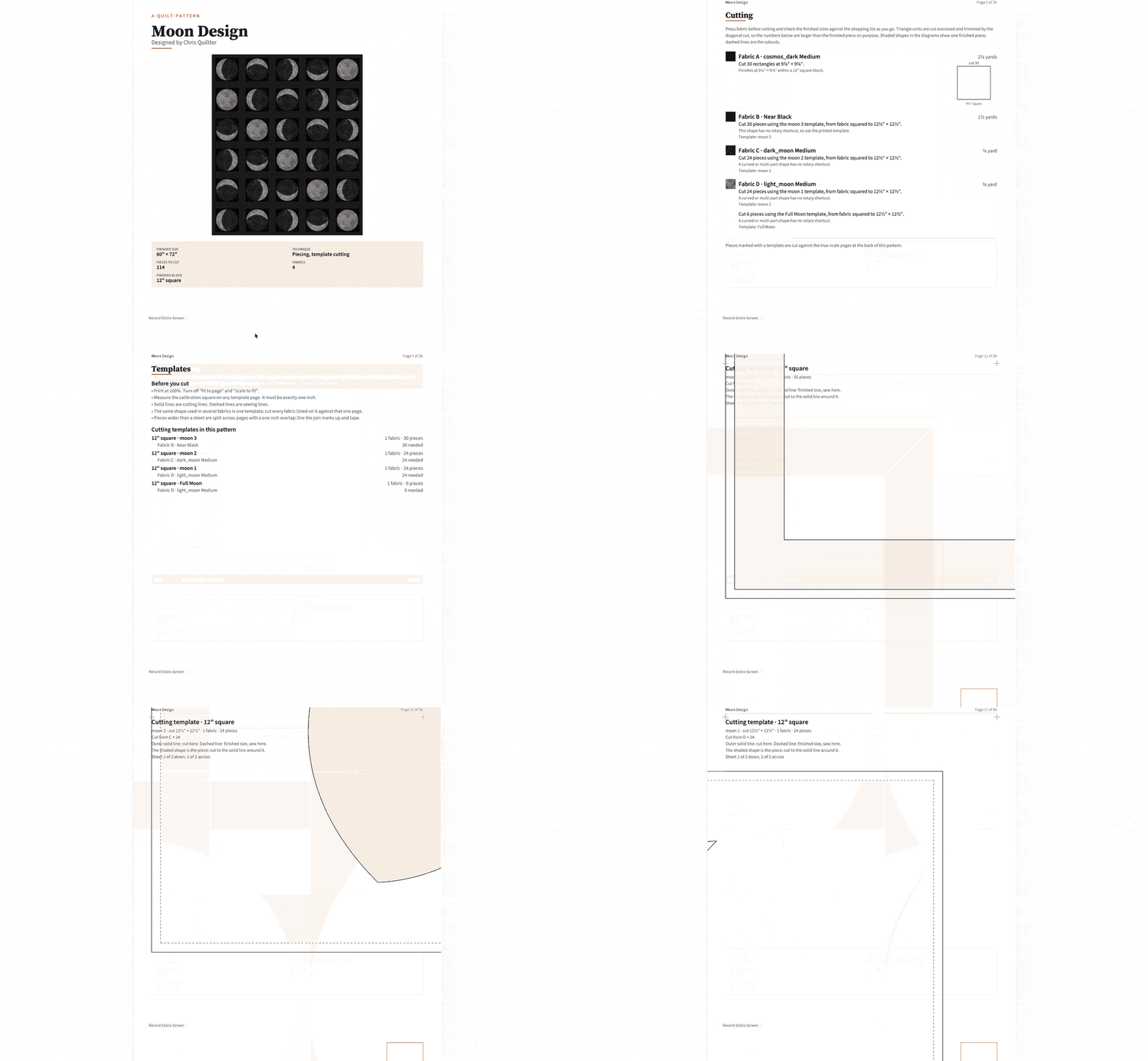
What the printable pattern can contain
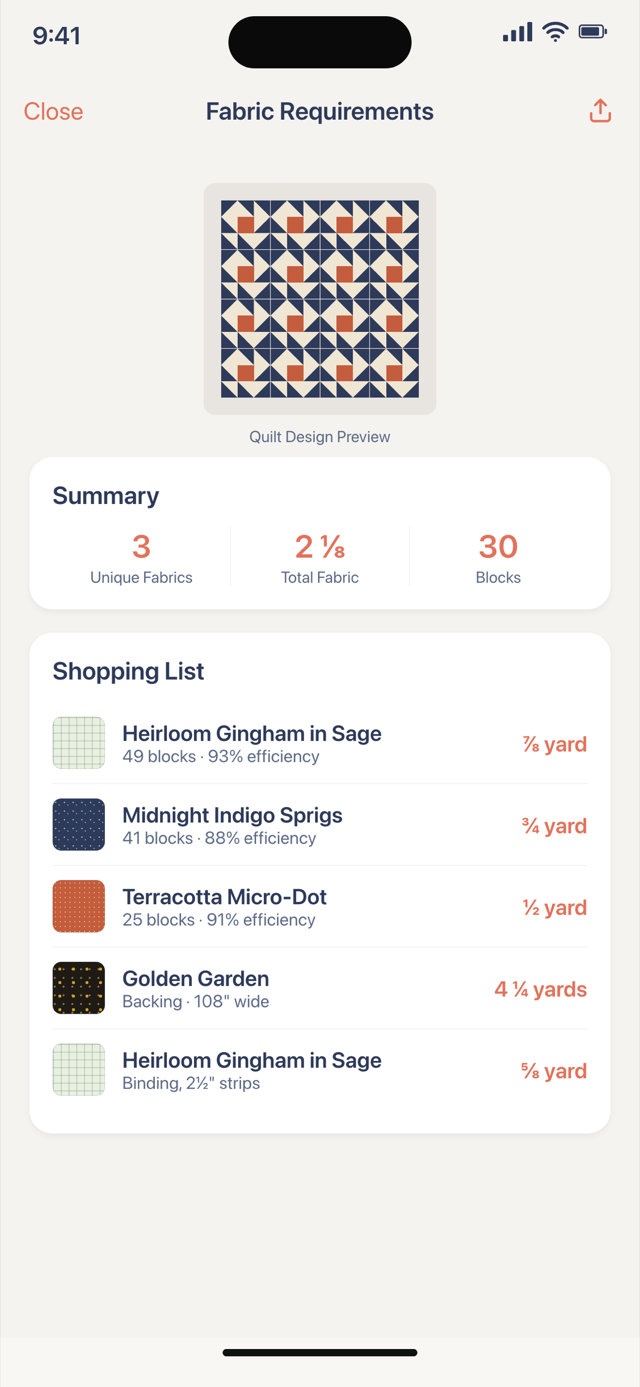
- Overview. Finished size, the block layout, piece count, seam allowance, and a fabric key with yardage. Backing, binding and batting are on that page too.
- Shopping list. Yardage for each fabric, plus backing and binding.
- Cutting chart. Strip widths, sub-cuts and piece counts. Identical pieces are grouped.
- Cut and fabric guide. A small picture of every fabric and shape, as cut.
- Blocks and assembly. Each block type with a piecing diagram, then the quilt row by row, with pressing directions.
- Finishing. Backing, batting, quilting and binding notes for that design.
- True-scale templates, when a shape has no rotary shortcut. A template page includes a one-inch calibration square so you can check the print.
- Mirrored templates, when you ask for them: every shaped piece flipped for sewing onto paper, in the same printable pattern, not a second product. Not numbered foundations — foundation paper piecing says where that line is.
- Strip sets and units, when pieces are cut in bulk. A quilt cut piece by piece skips that section. A blank note from you is skipped too.
Free, one quilt’s pattern, or Quilter
Cutting sizes, yardage, the cutting chart and the printable pattern need this quilt’s pattern or Quilter. Standalone public calculator pages stay free.
| Feature | Free visual design | One saved quilt | Quilter |
|---|---|---|---|
| Price | $0 | $4.99 once | $7.99 a month or $49.99 a year |
| Saved quilts | One saved quilt | One saved quilt | Unlimited while subscribed |
| Fabric photos | Up to ten fabric photos | Up to ten fabric photos | Unlimited while subscribed |
| Cutting sizes and printable pattern | Not included | This saved quilt | Included while subscribed |
| Public calculators | Stay free | Stay free | Stay free |
Checkout shows the price before you pay. Public calculator pages stay free.
This quilt's pattern ($4.99)
- This quilt’s pattern ($4.99) is a one-time purchase for the saved quilt you pay for. Save the quilt before you pay, so the purchase belongs to that quilt.
- You can change fabrics and colors, and make the whole quilt bigger or smaller in proportion. The quilt as you bought it stays available to download.
- A different block arrangement, shape or border is a new quilt. A copy needs its own $4.99 pattern.
- After a one-time purchase, unsaved edits hide the measurements. Save your changes to update the measurements. With Quilter, the measurements stay visible while you edit.
- The $4.99 purchase covers one quilt, not every future quilt. You do not need Quilter if this one quilt is all you want. Quilter includes cutting sizes, yardage and the printable pattern for every quilt you design while subscribed, plus unlimited saved quilts and fabrics.
Selling a pattern
Listing a pattern for sale needs a paid plan, not the $4.99 purchase. The Designer plan is the commercial license. A Quiltler-designed marketplace listing opens in the studio so the buyer can recolor it. A designer’s PDF on the marketplace is that file, not an editable Quiltler quilt.
Still choosing a finished size and a block repeat? Use quilt planner software before you open the printable pattern. A binding or backing sum with no saved quilt belongs on the quilting calculators.
Around the pattern
Designer guide
Every tool in the browser studio, including save, select and the printable pattern.
Fabric print scale
Crop, Stretch and Tile, and why a photo is not yet a measured repeat.
Quilting calculators
Free tools for one sum — binding, backing, batting — with no saved quilt.
Online quilt designer
The design wall in a browser tab, before you print a sewing plan.